LinkedIn Ads for Startups: Budget, Setup and What to Expect
LinkedIn Ads for Startups: Budget, Setup and What to Expect
LinkedIn ads can work for a startup, but only if you treat your first few thousand dollars as a research budget, not a growth engine. Clicks are expensive, audiences are small, and the platform needs time to learn. Go in with one clear offer, one tight audience and a few creatives, and you’ll learn fast. Go in hoping for a flood of demos by Friday, and you’ll learn something else: how quickly $50 a day disappears. 😅
We design for startups all day, and we’ve watched plenty of founders (and, okay, once or twice ourselves) launch a campaign with a fuzzy offer and a gorgeous ad. The ad was not the problem. This guide covers what LinkedIn ads cost in 2026, how much to budget, how to set up your first campaign, and where design quietly decides whether any of it pays off.
TL;DR
- Expect to pay roughly $6 to $12 per click and over $100 per lead in B2B SaaS and tech. Plan for a learning phase, not instant wins.
- A realistic first test is around $3,000 over three months, aimed at validating your message, not scaling.
- Start with one audience (50,000 members or more where you can), two or three creatives and one clear offer.
- Document ads and a calendar link on your thank-you screen help turn form fills into real conversations.
- Your landing page, creative and brand clarity decide your results as much as targeting does.
Table of Contents
- Is LinkedIn worth it for an early-stage startup?
- What LinkedIn ads really cost in 2026
- How much should a startup budget?
- Setting up your first campaign, step by step
- The creative and landing page problem
- Our take: design is your cheapest targeting tool
- A starter plan you can copy
- Where we can help
- FAQ
- Sources
Is LinkedIn worth it for an early-stage startup?
Sometimes. It depends on who buys from you and how much a customer is worth.
LinkedIn is strongest when you sell to businesses, your buyer has a findable job title, and one closed deal pays back many clicks. Its targeting lets you filter by industry, company size and job title, which is why LinkedIn’s own advertising guidance centers so much on lead generation. If your buyer is “head of people ops at a 200 to 1,000 person company,” LinkedIn can find that person. Few other channels can.
It’s a poor fit when your price is low, your product is consumer-facing, or you haven’t yet worked out who your customer is. One practitioner guide calls out a common startup trap: treating LinkedIn as a scaling channel before product-market fit drains scarce capital. It works best as a research channel once your offer, price point and audience are defined.
There’s also an argument for balance. A 2024 benchmark analysis found LinkedIn leading on lead conversion in B2B, while other social channels may be more cost-effective for early-funnel awareness. So LinkedIn is where you go to talk to a specific buyer, not necessarily where you go to be seen by everyone.
Quick gut check before you spend anything:
- Can you describe your buyer by job title and company size in one sentence?
- Does a single customer pay you enough to cover dozens of expensive clicks?
- Do you have a landing page that explains your offer in under ten seconds?
- Can you follow up with leads within a day?
Four yeses? Keep reading. Fewer than that, fix those first, and your ad budget will thank you.
What LinkedIn ads really cost in 2026
Let’s talk numbers, because this is where most founders flinch.
According to 2026 benchmarks, the average cost per click for B2B SaaS and tech on LinkedIn runs from $6.20 to $11.80, with cost per lead between $103 and $160, depending heavily on audience and format. A separate 2025 analysis put the median at $7.85 per click and $128 per lead, with top-quartile accounts under $5.00 per click and $90 per lead.
Here’s how those figures line up:
| Metric | Median | Top quartile |
|---|---|---|
| Cost per click | $7.85 | under $5.00 |
| Cost per lead | $128 | under $90 |
| Cost per 1,000 impressions | $38 | under $30 |
Those numbers come from the 2025 SaaS and tech benchmark linked above. Treat them as ballparks. Your own numbers will move with your audience, offer and creative.
Costs are also creeping up. One industry analysis puts the rise at about 8% year over year, though it also reports strong pipeline returns for B2B SaaS, in a range of 2.44x to 6.01x. Those returns come from companies with working funnels. A startup with an untested offer shouldn’t assume it’ll land in that range.
The pattern worth noticing: the best accounts in that benchmark paid nearly 40% less per click than the median. Practitioners attribute that to deep audience segmentation and better creative, not bigger spend. That’s good news for a small team. You can’t outspend anyone, but you can out-focus them.
Is there a minimum budget?
Platform minimums are low. One 2026 cost guide lists a $10 daily minimum per campaign and a $100 lifetime minimum. But the minimum LinkedIn lets you spend and the minimum that teaches you something are very different things.
How much should a startup budget?
There are two honest answers: a number to plan around, and a way to think about it.
The number: one early-stage guide advises preparing for at least $3,000 over three months, because Campaign Manager needs a learning period and most founders underestimate that. Another Adobe-hosted LinkedIn success guide suggests a daily budget of $50 to $100 for enough scale. And a practitioner guide on the first $1,000 says that money should validate message-market fit, not scale.
The way to think about it: do the math backwards. If your cost per lead lands near $128 and one in five leads becomes a sales conversation, that’s $640 per conversation before anyone buys. Now ask what a customer is worth to you. If the answer is a few hundred dollars a year, LinkedIn probably isn’t your channel yet. If it’s a five-figure contract, the math gets friendlier.
A simple way to pace your first test:
- Month one: one audience, two or three creatives, one offer. Goal: get clean data and see which message gets clicks.
- Month two: cut the weakest creative, test a new angle on the winner, check lead quality with your sales calls.
- Month three: decide. Keep going, change the offer or stop. All three are wins if you decided with data.
Setting up your first campaign, step by step
Here’s the setup flow, with the stuff nobody tells you at 11 p.m. when you’re staring at Campaign Manager.
1. Pick one objective and one offer
LinkedIn’s flow starts with an objective, such as awareness, consideration or conversions, then moves through targeting and ad format, as HubSpot’s walkthrough lays out. For a startup, choose one. If you want conversations with buyers, pick lead generation or website conversions and offer something specific: a demo, a teardown, a short report, a pricing guide.
An offer like “Learn more” is a shrug. An offer like “Get our 12-page onboarding benchmark for HR teams” gives a stranger a reason.
2. Build a tight audience (but not too tight)
Target by job title, seniority, industry and company size. Then check your audience size. LinkedIn’s success guide recommends at least 50,000 members, since smaller audiences tend to raise cost per result. That guide’s own startup guidance floats a range of 15,000 to 50,000 as a floor. Either way, don’t go tiny on a tiny budget.
There’s a tension here. One benchmark report notes that ultra-specific audiences under 500,000 members carry higher CPC but much lower CPL for qualified leads. In other words, a narrow audience costs more per click but can cost less per good lead. Start narrow enough to be relevant and broad enough for the system to learn.
If you’re still working out who that audience is, it helps to sharpen your positioning first. A good primer on startup campaign strategy and audience targeting can help you get your brand story straight before you pay to repeat it.
3. Choose your format
Format matters more than most founders expect. According to mid-2025 US data, Document Ads hit a 22.73% completion rate on Lead Gen Forms, versus 7.14% for single image ads and 2.26% for video. The same source says Document Ads now take around 11% of LinkedIn ad spend, up from 4%.
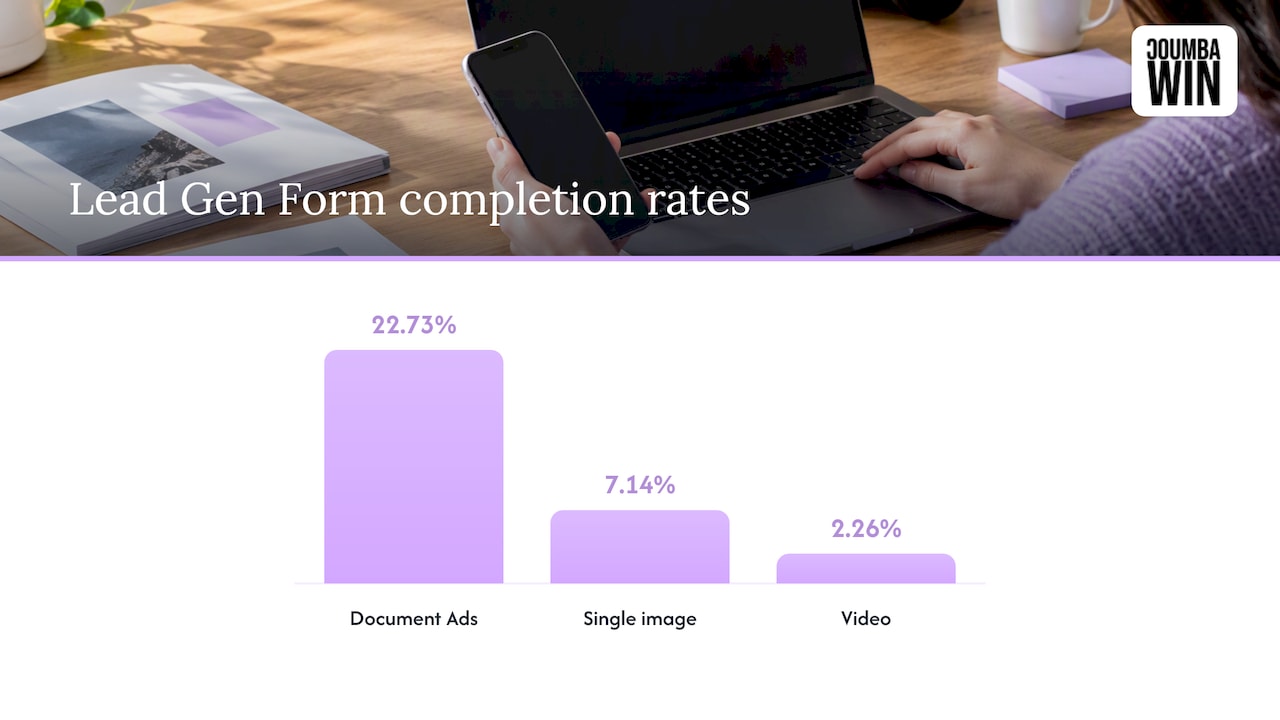
That’s one newsletter’s dataset, so don’t treat it as law. But it’s a strong hint: for a B2B startup with something worth downloading, a document ad (a short guide, a checklist, a teardown) is a smart first test.
Need exact dimensions before you hand assets to a designer? We keep a LinkedIn ad sizes cheat sheet for exactly that.
4. Create the Lead Gen Form (or don’t)
In Campaign Manager, forms live under Assets, then Lead generation forms. According to LinkedIn’s help page, you set the form details, choose lead fields, add custom questions if needed, and provide a privacy policy URL, which is required for approval. You also write a thank-you message and can add a landing page or an appointment booking link.
Use that booking link. Lead Gen Forms can show conversion rates of 6 to 10%, but practitioners warn that the leads are often lower quality, so pair every submission with a calendar link on the thank-you screen. It bridges the gap between “sure, send me that” and an actual meeting.
The alternative is sending clicks to your own landing page. Conversion rates are usually lower, but the leads have read more and chosen more. Run both if your budget allows. If it doesn’t, pick the one that matches your sales process: forms for a high-volume, low-touch offer, landing pages for a considered purchase.
5. Set budget, bidding and tracking
Start with a daily budget you can sustain for weeks, not days. Add clean UTM parameters and set up conversion events in GA4, as the first $1k guide suggests, and make CPL your primary metric and demos booked your secondary one.
LinkedIn’s pre-launch checklist also advises turning off audience expansion for lead generation campaigns, since it can dilute your targeting. Check that setting before you hit publish.
6. Launch, then leave it alone (for a bit)
This is the hard part. Campaign Manager needs time to learn. Changing bids, audiences and creative every two days resets the story and muddies your data. Give each test a fair window, review weekly, and change one variable at a time.
The creative and landing page problem
Here’s the part that makes our design-nerd hearts beat faster. You can have perfect targeting and still waste money if the ad looks like everyone else’s and the landing page makes people work.
Three things we see again and again:
- The ad says what you do, not why anyone should care. “AI-powered platform for modern teams” is wallpaper. Lead with the problem your buyer already feels.
- The landing page doesn’t match the ad. Someone clicks a promise about onboarding benchmarks and lands on a homepage with a generic hero. Gone.
- The page is slow, cluttered or confusing on mobile. At $7 to $12 a click, every bounce stings.
For landing pages, look at how conversion-first B2B SaaS sites structure their pages, and how interactive website features can keep a visitor engaged. If your story is still muddy, our notes on website storytelling techniques and brand storytelling for early-stage companies are a good place to start.
And if you’re also weighing search ads, our piece on cutting waste with Google Ads for SaaS shows how CRM data and landing pages keep spend honest. The same discipline applies here.
Our take: design is your cheapest targeting tool
Here’s our honest view, from the design side of the table.
Most advice about LinkedIn ads for startups is about bidding, audiences and budgets. All fair. But when we work with founders, the thing that moves results is rarely a bid tweak. It’s clarity. Does the ad make a specific person stop scrolling? Does the page deliver on the promise in one glance? Does the brand feel like a company you’d trust with a calendar invite?
That’s why we’re allergic to generic templates and AI-generated filler. In a feed full of the same blue gradients and the same stock handshake, a distinctive, custom look is a competitive advantage, and it’s one you don’t pay per click for. Strong visuals and a sharp message make every dollar of ad spend work a little harder. If you want the longer argument, we’ve written about why bold design differentiates startups and why strong branding helps startups grow fast.
Our advice, plainly: don’t start with the ad. Start with the offer, then the page, then the creative, then the targeting. Put the money in last. 🎯
— Coumba Evelyn
A starter plan you can copy
If you want something concrete, here’s a lean first-quarter plan. Adjust the numbers to your own cash and deal size.
| Week | Focus | What you’re checking |
|---|---|---|
| 1 | Offer, landing page, tracking | Does the page load fast and explain the offer in seconds? Are UTMs and GA4 events firing? |
| 2 to 3 | Launch one audience, 2 to 3 creatives | Which message earns clicks? Are leads the right job titles? |
| 4 to 6 | Cut the weakest creative, test a new hook | Cost per lead trend, lead quality from sales calls |
| 7 to 10 | Test document ad vs. single image, form vs. landing page | Which format books more meetings? |
| 11 to 13 | Decide: scale, rework the offer or pause | Cost per booked demo versus customer value |
A few habits that keep the plan honest:
- Talk to every lead. Even the bad ones. They tell you what your ad promised that your product didn’t.
- Write down your hypotheses. “Heads of ops respond to cost-saving angles” is testable. “Let’s see what happens” is not.
- Judge by meetings and pipeline, not clicks. A cheap click that never buys is the most expensive click.
Where we can help
If you’re a founder who’d rather spend your ad budget on a campaign that looks and feels unmistakably yours, that’s what we do. We design custom brands, websites, landing pages built in Webflow, pitch decks and more for startups, and we also handle ad management, SEO and email marketing. Tell us about your offer and we’ll show you how the creative, page and campaign can fit together. Start at coumbawin.com.
FAQ
Do LinkedIn ads work for lead generation?
They can, especially in B2B where you can target by job title, industry and company size. Lead Gen Forms often convert well, but practitioners warn the leads can be lower quality than landing page leads. Pair forms with a booking link and review lead quality weekly.
How much does it cost to advertise on LinkedIn?
Platform minimums are about $10 per day per campaign, but real B2B SaaS costs run closer to $6 to $12 per click and over $100 per lead, per 2026 benchmarks. For a meaningful test, plan on roughly $3,000 over three months.
Is it worth advertising on LinkedIn as a startup?
It’s worth it when you sell to businesses, know your buyer’s job title, and earn enough per customer to absorb a high cost per lead. It’s usually not worth it before you’ve found product-market fit or if your price is low. Treat the first budget as research.
What’s the best ad format for a first campaign?
Document ads are a smart first test if you have a useful guide or checklist. One US dataset showed them completing Lead Gen Forms at 22.73%, well ahead of video and single image ads. Test against a single image ad so you have your own data.
Sources
- LinkedIn Ads CPC & CPL Benchmarks by Industry (2026)
- 2025 LinkedIn Ads Benchmarks Every SaaS & Tech Marketer Needs
- How to get started with LinkedIn Ads for early-stage B2B SaaS startups
- LinkedIn ads for startups: the first $1k that doesn’t burn
- The Revenue Engine Newsletter
- LinkedIn Ads Success Guide
- Benchmark data, trends and what’s next (Metadata)
- TripleDart
- How to Advertise on LinkedIn (HubSpot)
- Create Lead Gen Forms in Campaign Manager (LinkedIn Help)
- LinkedIn Ads Cost in 2026: Complete CPC Pricing Guide