LinkedIn Ad Sizes 2026: The Full Spec Cheat Sheet

LinkedIn Ad Sizes 2026: The Full Spec Cheat Sheet
For LinkedIn Sponsored Content in 2026, use 1200×627 px (1.91:1) or 1200×1200 px (1:1) for images, and deliver video as MP4 in 16:9, 1:1, or 4:5 with a 200 MB cap. Those two rules cover most of what lands in your brief, but the details around them decide whether your ad gets approved on the first try or bounces back for a resubmit.
Here’s the shortlist to paste straight into a creative brief:
- Feed images: 1200×627 px (landscape) or 1200×1200 px (square), JPG/PNG/static GIF, max 5 MB.
- Video: 16:9, 1:1, 4:5, or 9:16, MP4 preferred, max 200 MB, duration anywhere from 3 seconds to 30 minutes.
- Carousel: 1080×1080 px per card, 2 to 10 cards, 10 MB max per card.
- Document ads: PDF, DOCX, or PPTX, up to 100 MB, with the first page rendered as the thumbnail.
The one rule that saves the most rework: always export at native resolution rather than stretching a smaller file to fit, and never ship a video without burned-in or SRT captions. LinkedIn autoplay defaults to mute, so a silent video with no captions is functionally invisible for the first three seconds that matter most.
Key Takeaways
Getting LinkedIn ad approval on the first submission depends on matching exact recommended dimensions, correct file formats, and size ceilings for each specific ad format in 2026.
| Point | Details |
|---|---|
| Default image sizes | Use 1200×627 px or 1200×1200 px, both under the 5 MB file cap. |
| Video format rules | Deliver MP4 in 16:9, 1:1, or 4:5, staying under 200 MB with captions attached. |
| Carousel card specs | Build each card at 1080×1080 px, 10 MB max, across 2 to 10 cards. |
| Document ad thumbnails | Design the first page as a standalone visual since it becomes the preview. |
| Native resolution wins | Export at full recommended size rather than upscaling a smaller source file. |
Ready to hand off assets that pass review the first time? Coumba Win Design builds branded LinkedIn creative, from Sponsored Content images to document ad decks, sized correctly from the first draft. Explore our ready-to-use design components if your team needs a faster path from brief to export.
Table of Contents
- What Are LinkedIn Ad Sizes for Sponsored Content Images?
- What Are the LinkedIn Video Ad Specs for 2026?
- What Sizes Do Carousel, Document, and Message Ads Need?
- How Do You Build Export Presets That Avoid Rejections?
- LinkedIn Ad Size Chart: Quick Reference by Format
- What Coumba Win Design Watches for in LinkedIn Creative
- Sources
- FAQ
What Are LinkedIn Ad Sizes for Sponsored Content Images?
LinkedIn’s own spec sheet gives you two recommended sizes for single-image Sponsored Content: 1200×627 px at a 1.91:1 ratio, or 1200×1200 px at a clean 1:1 square. Those aren’t arbitrary numbers. They’re what LinkedIn’s feed renderer is built to scale cleanly across desktop and mobile without introducing crop artifacts or soft edges.
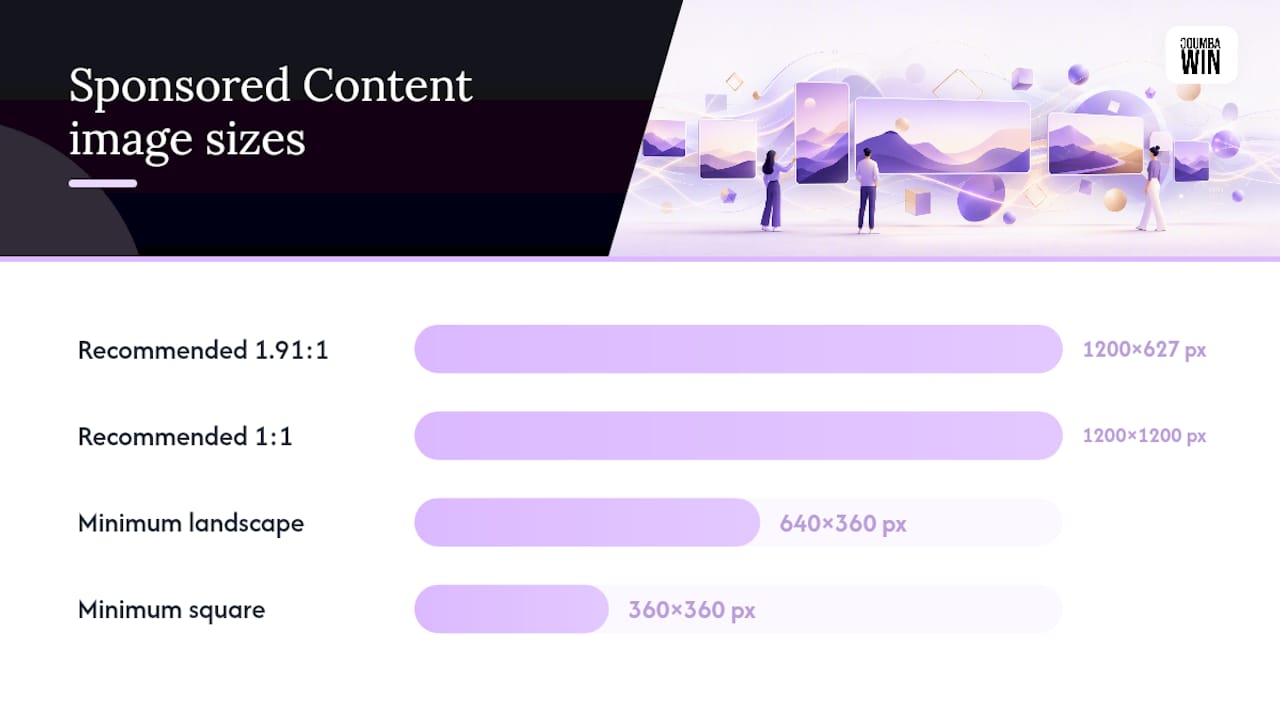
The platform will technically accept smaller files. The minimum accepted dimensions are 640×360 px for landscape and 360×360 px for square, but “accepted” and “recommended” are doing very different jobs here. A 640×360 image gets upscaled or displayed at low fidelity on high-density retina screens, and on a platform where B2B buyers are judging your legitimacy in half a second, a soft logo is a bad first impression. There’s no published maximum pixel ceiling beyond keeping the file under 5 MB, so bigger, sharper source files are always the safer bet as long as you compress smartly before export.
File types are straightforward: JPG, PNG, or static GIF. Animated GIFs don’t run as Sponsored Content images; that’s what video ad specs exist for.
A few design rules matter more than the raw dimensions:
- Keep logos and text away from the frame edges to avoid clipping due to LinkedIn’s feed crop variations across devices.
- Write your headline assuming truncation around 70 characters. Longer copy gets cut with an ellipsis, and a headline that dies mid-sentence reads sloppy.
- Default to 1200×1200 for mobile-first campaigns. Square claims more vertical feed real estate on a phone screen, which tends to slow the scroll.
- Reserve 1200×627 for content promotion, since it mirrors the link-preview card shape readers already associate with articles and blog posts.
Pro Tip: Build your master file at 2400×1254 or 2400×2400 and downscale for export. You’ll get sharper compression at 5 MB than if you design natively at the minimum resolution and try to stretch it later.
What Are the LinkedIn Video Ad Specs for 2026?
Video ads accept four aspect ratios: 16:9, 1:1, 4:5, and 9:16, with recommended pixel targets appropriate for each ratio to ensure quality on LinkedIn’s platform. Microsoft Learn’s LinkedIn Marketing integration documentation lists these as the supported ratios for both self-serve Campaign Manager uploads and API-driven creative pipelines.
Format-wise, MP4 with H.264 encoding is the safest bet. Max file size sits at 200 MB, and accepted duration runs from 3 seconds all the way to 30 minutes, though nobody should actually be running a 30-minute Sponsored Content video. Third-party production guidance consolidated across 2026 creative playbooks puts the sweet spot at 15 to 30 seconds for awareness and top-of-funnel campaigns, since attention drops sharply past that window in a professional feed where people are scrolling between meetings.
Frame rate and audio settings matter more than most teams realize:
- Deliver source footage at 720p or higher, even if your final export gets compressed down.
- Target roughly 30 fps; higher frame rates just inflate file size without a visible feed benefit.
- Use AAC audio, but design for mute. LinkedIn autoplay starts silent by default, so your hook has to work visually before sound ever kicks in.
- Add SRT captions or burn them in. Either works, but silent, uncaptioned video is the single most common reason a decent ad underperforms.
Before uploading, run this quick export checklist: confirm the aspect ratio matches your placement, verify file size is under 200 MB, check that captions are attached or embedded, and preview at actual size, not zoomed in on a 27-inch monitor where every flaw looks fine.
Pro Tip: If your team pushes creative through an automated pipeline rather than manual Campaign Manager uploads, check the Videos and Creatives API migration guidance before your next sprint. Older API versions get deprecated on a schedule, and a stale integration is a worse launch-day surprise than a wrong crop.
What Sizes Do Carousel, Document, and Message Ads Need?
Beyond single image and video, four other formats show up constantly in LinkedIn briefs, and each has its own file rules.
Carousel ads run at 1080×1080 px per card, square only, in JPG or PNG. You can build anywhere from 2 to 10 cards, and each card carries its own 10 MB ceiling along with its own headline text, so plan copy per card rather than writing one long caption and chopping it up.
Document ads accept PDF, DOCX, or PPTX files up to 100 MB. LinkedIn renders the first several pages as an in-feed, swipeable preview, which means your cover page is doing the job a thumbnail does everywhere else. A document with a dense text-only title page loses the scroll before anyone opens it.
Message and Conversation Ads allow an optional banner at 300×250 px, capped at 2 MB in JPG or PNG. These formats also carry character limits on subject lines and body copy, with subject lines running roughly 60 characters and body text extending up to about 1,500 depending on the exact message format you choose.
Right-rail and dynamic text ads use small thumbnails and logos, typically 100×100 px, displayed in the desktop sidebar rather than the main feed. They’re a shrinking share of LinkedIn’s overall ad inventory as the platform leans further into feed-native placements, but they’re still live and still need correctly sized assets if your account runs them.
How Do You Build Export Presets That Avoid Rejections?
Save these as standing presets rather than rebuilding settings every campaign:
- 16:9 preset: 1920×1080, H.264 MP4, target bitrate around 8 to 10 Mbps, AAC audio, 30 fps.
- 1:1 preset: 1080×1080, same codec and bitrate range, used for both video and static carousel cards.
- 4:5 preset: 1080×1350, ideal for mobile feed dominance where vertical space beats widescreen.
LinkedIn’s crop behavior shifts slightly between desktop and mobile rendering, and anything hugging the border risks getting sliced.
Before you publish, run a two-step test: preview the ad as a private post first to check how text and captions actually render, then load it into Campaign Manager’s preview pane to catch anything the private post view missed. Most rejections trace back to three causes: an oversized file that missed the 200 MB or 5 MB ceiling, a codec other than H.264, or an aspect ratio that doesn’t match one of the four accepted video ratios. Catch those in preview and you’ll rarely see a bounce.
Pro Tip: For teams juggling heavy asset volume, a structured image preparation workflow built around consistent export presets cuts far more rejected-upload time than fixing files one at a time after the fact.
LinkedIn Ad Size Chart: Quick Reference by Format
| Format | Recommended Resolution | Aspect Ratio | File Types | Max File Size |
|---|---|---|---|---|
| Single image (feed) | 1200×627 or 1200×1200 | 1.91:1 or 1:1 | JPG, PNG, static GIF | 5 MB |
| Video | 1920×1080 or 1080×1080 | 16:9, 1:1, 4:5, 9:16 | MP4 | 200 MB |
| Carousel (per card) | 1080×1080 | 1:1 | JPG, PNG | 10 MB per card |
| Document ad | Native page size | Varies by page | PDF, DOCX, PPTX | 100 MB |
| Message banner | 300×250 | Standard banner | JPG, PNG | 2 MB |
| Right-rail thumbnail | 100×100 | 1:1 | JPG, PNG | Not separately published |
What Coumba Win Design Watches for in LinkedIn Creative
Square wins most mobile-first campaigns for us because it eats more vertical scroll space, and on a platform where the average session is short bursts between meetings, that extra real estate buys an extra half second of attention. Landscape still earns its place when the goal is content promotion. It mirrors the link-preview shape readers already trust.
Our one non-negotiable: design the first page of any document ad as a standalone visual, then test it shrunk to 320 px wide. If it doesn’t read at phone-thumbnail size, it won’t survive the feed. We’ve applied that same discipline building interactive landing pages for startup clients, where the same “does it work small” test decides whether a hero section converts.
— Coumba Evelyn
Sources
- Single Image Ads Specifications | Advertise on LinkedIn
- Create and Manage Video Ads - LinkedIn | Microsoft Learn
- LinkedIn Ad Sizes 2026: Complete Spec Sheet
- LinkedIn Video Ad Specs and Formats 2026 | Shootsta
FAQ
What Is the Best Image Size for LinkedIn in 2026?
For Sponsored Content, 1200×1200 px (1:1) works best for mobile-first feeds, while 1200×627 px (1.91:1) suits content promotion that mimics a link-preview card. Both stay under the 5 MB file limit.
What Are the Sizes for LinkedIn Ads Across Formats?
Images run 1200×627 or 1200×1200 px, video accepts 16:9, 1:1, 4:5, and 9:16 up to 200 MB, carousel cards are 1080×1080 px, and document ads accept files up to 100 MB.
What Size Is Best for a Single LinkedIn Ad?
If you only have budget for one asset, build it at 1200×1200 px. Square format holds up across both desktop and mobile placements without needing a second crop.
What Is the 3/2/1 Rule on LinkedIn?
There’s no officially documented “3/2/1 rule” from LinkedIn’s own spec pages or Microsoft Learn documentation. If you’ve seen it referenced elsewhere, treat it as informal creative shorthand rather than a platform requirement, and rely on the sizes and ratios confirmed in this guide instead.