Startup Usability Testing: About Five Users Per Round, Fix Friction
Startup Usability Testing: About Five Users Per Round, Fix Friction
Start with short, iterative qualitative tests, roughly five users per round, and fix the biggest problems before you test again. Pick guerrilla sessions when you need quick gut checks on an early idea, and remote or moderated sessions when you need depth or hard-to-reach users. Rank what you find by impact, ship the fixes, and run the next round within a few weeks.
TL;DR:
- Match prototype fidelity to the question: use paper for concept clarity, a clickable flow for task completion, and a live product to investigate abandonment.
- Set one research question and one or two observable success criteria before each session; skip tests that cannot inform a decision this sprint.
- The five participant rule applies to qualitative discovery, while quantitative studies often need 30 or more people for reliable completion or timing estimates.
- Guerrilla sessions take 10 to 15 minutes and suit broad early questions, but they cannot reliably reach niche audiences such as licensed specialists.
- Choose moderated sessions for complex or high stakes flows where follow up questions matter; unmoderated tests suit simple tasks, but unclear instructions go unprobed.
Table of Contents
- When should a startup test, and what should each test answer?
- Which testing method fits your stage: guerrilla, moderated, or unmoderated?
- How do you recruit participants, and is five users really enough?
- What does a copyable test protocol look like?
- Which tools and low-cost tactics get you testing without a big budget?
- How do you analyze results and decide what to fix first?
- How often should you test, and what does it cost?
- How do you make testing part of your team’s workflow?
- What founders get wrong about testing, in my experience
- How we can help you test, learn, and ship
- FAQ
- Sources
When should a startup test, and what should each test answer?
Here’s the trap we see founders fall into: they treat usability testing as a big event. You schedule it, you dread it, you put it off until the product is “ready,” and then you discover the navigation makes no sense a week before launch. A better habit is to test small and often, with each test built around one question tied to the stage you’re in.
Think of your product’s life in stages, and each one has a different job for testing:
- Idea stage: You’re validating assumptions. Do people understand the problem you’re solving, and does your proposed solution make sense to them? Paper sketches or a clickable mockup are plenty.
- Prototype stage: You’re checking task success. Can someone complete the core flow without help, and where do they hesitate? A prototype with just one working path is enough.
- MVP stage: You’re hunting for friction. Where do people drop off between signing up and getting value, and what confuses them on first use?
- Post-launch: You’re improving conversion and retention. Which screens leak users, and what change would plug the leak?
Fidelity should match the question. Paper or low-fidelity wireframes are great when you’re asking “does this concept land?” because nobody gets distracted by color choices or polish. A clickable prototype suits “can people finish this task?” A live product suits “why are people abandoning checkout?” If you’re not sure what to build for an early test, our guide to testing one core flow in 30 to 90 minutes shows how small a testable artifact can be.
Write one question and one or two success criteria
Every test gets a single research question, written in plain words. “Can a first-time visitor find pricing and understand what’s included?” works. “See what users think of the site” doesn’t, because you can never fail it, which means you can never learn from it.
Then add one or two success criteria that you can check against what you observe. For example:
- Participants complete the signup task without help.
- No participant misreads what the free plan includes.
- Participants can state in their own words what the product does after landing on the page.
Write these down before the first session. It keeps you honest, because when the sessions get uncomfortable (and they will, in a good way), you won’t be tempted to move the goalposts. If a test doesn’t map to a decision you can make this sprint, shrink it or skip it.
The business case is easy to make to a skeptical cofounder, too. Small usability problems add up to lost users, and we’ve written about how UX shapes platform retention for startups if you need ammunition for that conversation.
Which testing method fits your stage: guerrilla, moderated, or unmoderated?
There’s no single best method, only the best fit for your question, timeline, and access to users. Let’s walk through the main options like we’re picking tools from a toolbox, because that’s really what this is.
Guerrilla testing: fast, cheap, and a little awkward
Guerrilla testing means grabbing people in a coffee shop, a coworking space, or your own network and asking for a few minutes of their time. The University of Glasgow’s UX framework describes it as short sessions of 10 to 15 minutes run in public or through your contacts, and calls it highly effective for formative research early in development. The same guidance warns that it may not reach niche target demographics, so treat it as one part of a wider research strategy rather than the whole thing.
It’s perfect when you’re asking broad questions: Is the headline clear? Can people find the main button? Does this onboarding screen make sense? It’s a poor fit when your users are, say, hospital procurement managers or licensed electricians, because the person sipping a latte next to you probably isn’t one.
Moderated testing: slower, deeper, richer
In a moderated session, a facilitator sits with the participant (in person or on a video call) and watches them work through tasks, asking follow-up questions in the moment. You get the “why” behind the behavior. When someone pauses on a form field, you can ask what they were thinking right then, instead of guessing from a recording later.
The cost is scheduling effort and facilitator time. Sessions typically run longer, and you need to recruit people who’ll show up. Use this method when the flow is complex, when the stakes are high (payments, health data, anything regulated), or when earlier rounds left you with questions that observation alone can’t answer.
Remote unmoderated testing: scale and speed
In unmoderated tests, participants complete tasks on their own time while their screen and voice are recorded. You write the tasks, launch the study, and review recordings when they arrive. It’s great for quick validation across many people, especially when your target users are easy to find online and your tasks are simple enough to be understood without a facilitator in the room.
The trade-off is that you can’t probe. If someone misunderstands a task, you won’t know until you watch the recording, and by then the session is over. Write tasks with extra care, and always pilot your script on a colleague first.
A simple decision checklist
Answer these four questions, and the method usually picks itself:
- How much time do you have? Need answers this week? Guerrilla or unmoderated. Have more time? Moderated becomes realistic.
- Can you reach your real users? If yes, moderated or remote is on the table. If your users are niche, don’t rely on strangers in a café.
- What’s your budget? Guerrilla costs almost nothing but time. Moderated costs facilitator hours and incentives. Unmoderated sits in between, depending on how you recruit.
- Do you need depth or breadth? Depth points to moderated. Breadth and speed point to unmoderated.
Pro Tip: Combine methods across rounds instead of choosing one forever: guerrilla for round one to catch obvious problems, moderated for round two to understand the stubborn ones, unmoderated for round three to confirm the fixes worked with a wider group.
How do you recruit participants, and is five users really enough?
Recruiting is where most founders stall, so let’s make it unglamorous and practical. You don’t need a panel vendor to run your first few rounds.
Good places to start:
- Your founders’ network: Friends of friends who match your target user are fair game. Avoid your closest friends and family, since they tend to be too kind.
- Beta users and waitlist signups: These people already raised their hands. A short email offering a gift card or early access in exchange for their time often gets a surprisingly good response.
- Communities where your users hang out: Niche Slack groups, subreddits, and LinkedIn groups work well if you’re transparent about what you’re asking and why.
- Guerrilla recruiting: Coworking spaces, campus common areasal meetups, as long as the people you meet resemble your users.
Use a two- or three-question screener to avoid wasting sessions. Ask about behavior, not demographics: “How do you currently handle X?” beats “Are you a small business owner?” If the answer doesn’t match your target user, thank them and move on.
What the five-user rule actually says
The Nielsen Norman Group’s well-known guidance is that qualitative testing with five participants surfaces most of the usability problems in a design, and that spreading your budget across several small rounds beats one big study:
Testing with five users identifies approximately 85% of usability issues. That’s why several small rounds with fixes in between give you better value than a single large round.
The logic is simple. After the first few people, you start seeing the same problems repeated, so each extra participant adds less new information while costing the same. Fix what you found, then bring in a fresh five to see whether the fixes worked and what the cleaner version reveals.
When five isn’t enough
The rule has limits, and it’s worth knowing them. NN/g explains that five participants works for qualitative studies but not quantitative ones: qualitative testing is formative and finds problems, while quantitative testing measures population-level metrics and often needs 30 or more participants for reliable confidence intervals.
So expand your sample when:
- You have distinct user segments. If buyers and administrators use your product differently, run five of each rather than five total.
- You need numbers, not just insights. Task completion rates or time-on-task you plan to report need larger samples.
- Earlier rounds produced few new insights. If round after round returns nothing surprising, your tasks may be too easy or your participants too similar to your team.
What does a copyable test protocol look like?
A good protocol is boring on purpose. When the format is predictable, you can focus on watching people instead of improvising. Here’s a blueprint you can adapt for almost any startup test.
Turn your research question into a set of tasks
Start with the research question and work backward. If the question is “Can a first-time visitor sign up and invite a teammate?”, your tasks might be: find out what the product does, create an account, set up a first project, and invite someone. Rank them by importance and run the critical ones first, because participants get tired and you may run out of time.
Write tasks as scenarios, not instructions. “You’ve just heard about this tool from a coworker and want to try it with your team” is better than “Click Sign Up.” The first lets you see whether people can find the button on their own. The second hands them the answer.
The session flow
Here’s the sequence we use, in order:
- Intro and consent: Explain what you’re testing (the product, not them), ask permission to record, and remind them they can stop anytime.
- Warm-up question: Ask how they currently handle the problem your product solves. It relaxes people and gives you context.
- Core tasks (the bulk of the session): Hand over one scenario at a time. Ask them to think aloud. Stay quiet and resist the urge to rescue them.
- Debrief (3 to 5 minutes): Ask what was easiest, what was most frustrating, and what they expected to happen at the moments they hesitated.
- Optional short survey: A few rating questions can help you compare rounds, but don’t treat them as statistics with a sample this small.
Timing by method
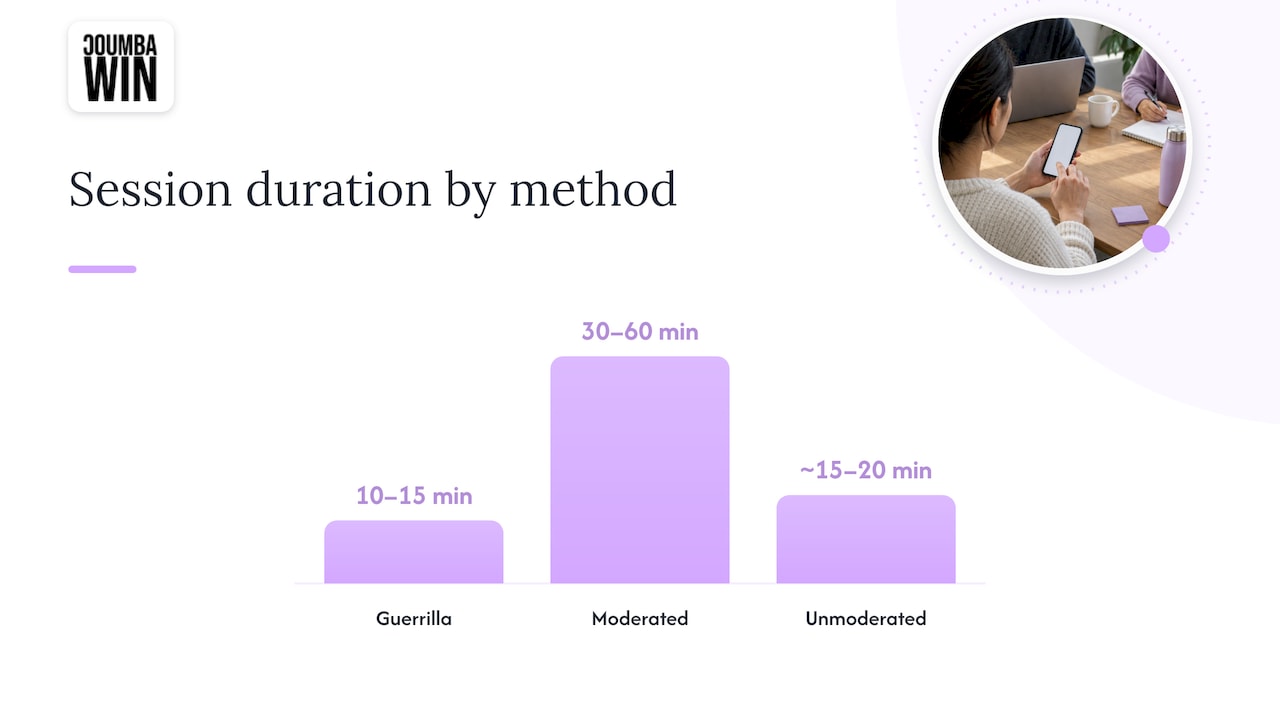
Guerrilla sessions fit in 10 to 15 minutes, consistent with the Glasgow guidance, so cut to two or three tasks and skip the survey. Moderated sessions run 30 to 60 minutes, which leaves room for all your tasks and a proper debrief. For unmoderated studies, keep the total under about 15 to 20 minutes, since people drift without a human in the room.
What to record
Capture three things for every session: observations (what they did, where they hesitated), verbatim quotes (their exact words are persuasive in a way your summary never will be), and evidence (screen recording, screenshots, or timestamps). Assign one person to take notes so the facilitator can stay present.
Consent, data handling, and accessibility
Get explicit permission before recording. Tell participants how the recording will be used and who will see it, store files somewhere access-controlled, and delete them when you no longer need them. Don’t collect personal details you don’t need. If a participant shares sensitive information while testing, don’t paste it into shared documents.
Build in accessibility too. Offer participants who use assistive technology a way to take part, check that your test materials work with screen readers, and make sure your consent form is written in plain language. If you recruit only people who navigate the way you do, you’ll miss problems that matter a lot.
Pro Tip: Run one pilot session with a teammate before the real thing. You’ll catch confusing task wording, a broken prototype link, and a muted microphone, all in the one session where it doesn’t matter.
Which tools and low-cost tactics get you testing without a big budget?
You don’t need an enterprise research stack. You need a way to put your product in front of people and a way to remember what happened. Here are the tool categories worth knowing, without turning this into a vendor beauty contest:
- Remote unmoderated platforms: These recruit participants, deliver your tasks, and record screens and voice. They suit quick validation when your users are easy to find online.
- Screen-recording and meeting tools: Any video-call tool that records both screen and audio will run a moderated session. Free tiers often cover a startup’s early needs.
- Session-replay and heatmap services: These show what real users do inside your live product, including where they click and where they bail. They’re quantitative-leaning and great for spotting where to look, though they can’t tell you why.
- Survey and screener tools: A simple form handles recruitment screeners and post-session questions. Keep them short.
Bootstrap tactics that actually work
Money is tight, so lean on what you already have:
- Build a guerrilla kit: A laptop, a phone, a printed consent card, a few gift cards, and a one-page script. That’s it.
- Mine your beta list: People who signed up early are usually willing to talk, and they already care about the problem.
- Use free recording setups: Built-in screen recorders and free video-call tiers do the job.
- Offer sensible incentives: Gift cards, early access, extended trials, or a donation to a cause they pick. Match the incentive to the time you’re asking for.
Choosing by what you need to learn
Here’s the simple rule: if you need to understand why people struggle, pick tools that give you qualitative depth, such as moderated video sessions and unmoderated recordings you can watch. If you need to know how often and where it happens, pick tools that give you quantitative signals, such as replay and heatmap services or larger unmoderated studies. Most startups start with qualitative because it’s cheaper to act on, then add quantitative tooling once there’s enough traffic to make the numbers meaningful.
For mobile products, add device-specific checks to your plan. Our post on mobile UX best practices for startups covers the quirks worth watching for.
How do you analyze results and decide what to fix first?
After a round of sessions you’ll have a pile of notes, recordings, and strong opinions. The goal is to turn that pile into a short, ordered list of fixes within a day or two, while the sessions are still fresh.
Affinity mapping in an hour
Write each observation on its own sticky note (physical or digital), one issue per note, with a quote or timestamp attached as evidence. Then cluster the notes by theme. You’ll see patterns quickly: some people couldn’t find the pricing link, others misread the same label, and some got stuck at the same form field. The clusters are your findings.
A few habits make this go smoothly:
- Separate observation from interpretation. “Participants clicked the logo expecting to go back” is an observation. “The navigation is bad” is a guess.
- Count how many people hit each issue, but don’t overthink the math with five participants.
- Keep the quotes. A direct quote from a real user changes minds faster than any slide.
Rate severity, then weigh impact against effort
Give each issue a severity: does it block the task, slow the user down, or just annoy them? Then plot issues on a simple grid of user impact versus effort to fix. High impact, low effort goes first. High impact, high effort gets scheduled. Low impact, high effort gets parked, probably forever.
| Issue type | What it looks like | Typical action |
|---|---|---|
| Blocker | Participants can’t complete a core task | Fix before the next round |
| Major friction | Participants finish but struggle or need hints | Fix this sprint |
| Minor annoyance | Participants notice but aren’t slowed | Batch with other work |
| Cosmetic | Preference-level feedback, no effect on the task | Log it and revisit later |
Turn findings into tickets, then verify
A good ticket states the problem, the evidence, the proposed fix, and how you’ll know it worked. For instance: “Three of five participants did not find the invite button on the project screen (see clips 2, 4, 5). Proposed fix: move the button into the header. Done when four of five participants in the next round find it unaided.” That last line is the acceptance criterion, and it closes the loop. The next round of testing is your QA for research findings.
- Keep tickets small and specific so engineering can pick them up without a meeting.
- Link to evidence so nobody has to take your word for it.
- Retest the fixes, and add any new problems the fixes introduced.
How often should you test, and what does it cost?
The sweet spot for most startups is a small test at regular intervals, lined up with your release rhythm. That’s frequent enough that problems get caught while they’re cheap to fix, and light enough that it doesn’t derail a sprint. It also follows the logic behind the NN/g recommendation: distribute your effort across multiple small rounds instead of betting everything on one large study.
Here’s a rough way to think about the trade-offs between methods:
- Guerrilla: The cheapest option in dollars, with the main cost being a few hours of your team’s time. Set aside time for prep and debrief. Quality depends heavily on whether you can find people who resemble your users.
- Moderated: The most expensive per session, since you’re paying for facilitator hours and participant incentives, and scheduling takes real effort. Allow time for recruiting and analysis before reaching findings. It’s worth it when you need depth.
- Unmoderated: Usually a few days from launching the study to reviewing results, with costs that scale with how many participants you recruit and how you find them.
Your exact costs will vary with your market and how you recruit, so we won’t pretend there’s a universal price tag. Track your own numbers for the first couple of rounds and you’ll have a reliable baseline.
Show the value without a fancy ROI model
Research budgets get cut when nobody can see what they bought. Make the return visible in terms your team already cares about:
- Count shipped fixes. “This round led to several changes, some of which are live” is concrete.
- Track one metric before and after. If testing found a signup problem and you fixed it, show the signup completion rate on either side.
- Keep a running log of avoided mistakes. The feature you didn’t build because users didn’t want it counts.
Small, measurable improvements shipped on a steady cadence are the strongest case you can make.
How do you make testing part of your team’s workflow?
Testing only pays off if findings reach the people who build the product. The trick is to make handoffs boring and repeatable, so nobody has to reinvent the process every time.
Start with a one-page template you fill out after every round:
- Context: What you tested, which version, which method, and who participated.
- Key findings: The most important issues, each with a quote or clip.
- Recommended fixes: One proposed change per issue, with severity.
- Acceptance criteria: How you’ll know the fix worked in the next round.
Then keep the mechanics tight. Write tickets that engineering can act on without a meeting, tag them so they’re easy to find, and schedule a quick QA pass soon after the fix ships. Invite designers and engineers to watch at least one session live or a short highlight reel. Nothing builds empathy for a confusing screen like watching a stranger struggle with it.
If you want more on connecting research to product choices, we’ve written about why UX research drives decisions in product strategy, and it pairs well with the templates above.
One more connection worth making: usability fixes often help discoverability too, since clearer pages keep visitors around longer. This overview of how user experience affects SEO is a useful read if you’re juggling both goals.
What founders get wrong about testing, in my experience
The most common mistake isn’t skipping testing. It’s testing too late and with the wrong people. Founders wait for a polished build, recruit friendly acquaintances, and walk away with applause instead of insight. Another common mistake is treating one big round as the finish line, when the real value comes from repeated rounds, after the obvious problems are gone and the subtle ones show up.
My strong opinion: a rough test this week beats a perfect test next quarter, every time. A clumsy paper prototype in front of a few honest strangers will teach you more than a beautiful study that never gets scheduled. And the awkward moments, when someone looks at your carefully designed screen and says “I have no idea what this does,” are the whole point. Learn to love them.
— Coumba Evelyn
How we can help you test, learn, and ship
If you’d rather not run this alone, we work with founders who treat design as a competitive advantage, and fast, focused testing fits that approach. We can take on as much or as little of the process as you need:
- UX research support: We help you define the research question, recruit the right participants, and structure the study.
- Prototype design: We build the testable flow, whether that’s a sketch or a clickable prototype, so you aren’t waiting on engineering.
- Moderated testing facilitation: We run sessions and bring you clear findings with quotes and clips.
- Accessibility audits: We check that your product works for people who use assistive technology.
- Implementation handoffs: We turn findings into design changes your developers can ship.
Tell us where your product is stuck, and we’ll help you plan the first round. Explore our services and recent work and get in touch to book a conversation about your next test.
FAQ
Is it true that 90% of startups fail?
We can’t point to a reliable, sourced figure for that statistic, and failure rates vary widely depending on how “failure” and “startup” are defined. What we can say is that building something people struggle to use is a common and avoidable contributor, which is why testing early and often is worth the effort.
How much does usability testing cost?
It depends on the method. Guerrilla testing costs mostly your team’s time, while moderated sessions add facilitator hours and participant incentives, and unmoderated studies scale with how many people you recruit. Track your first couple of rounds to set a baseline for your own market.
What are five types of usability testing?
Common types include guerrilla, moderated in-person, remote moderated, remote unmoderated, and quantitative benchmarking. The first four are mostly qualitative and aimed at finding problems, while benchmarking measures metrics and needs larger samples, often 30 or more participants.
What is Jakob Nielsen’s 5-user rule for user testing?
The rule holds that qualitative testing with about five participants finds roughly 85% of usability issues. The takeaway is to run several small rounds with fixes in between instead of one large study.