
Get Indexed and AI Ready with Technical SEO Basics for Marketers
Get Indexed and AI Ready with Technical SEO Basics for Marketers
Technical SEO makes your website discoverable and indexable by search engines and AI agents, so fix these fundamentals first. Before you write another blog post or tweak a headline, check whether your pages can actually be crawled and whether they pass Core Web Vitals. If either one is broken, it will significantly impair the ability of search engines and AI tools to see the page.
TL;DR:
- Ensuring your pages are crawlable and properly indexed is essential, as unindexed pages cannot rank regardless of content quality.
- Fixing crawl errors, optimizing robots.txt and sitemap files, and handling JavaScript rendering issues are high-priority tasks for technical SEO.
- Core Web Vitals metrics such as load speed, responsiveness, and visual stability directly influence both user experience and search ranking positions.
- Site architecture, internal linking, and schema markup improve both discoverability by bots and the clarity of content for AI retrieval systems.
- Basic security, redirect management, and canonical tags are foundational, often low-cost fixes that significantly impact your website’s visibility.
Table of Contents
- What is technical SEO, anyway?
- Why technical SEO matters now, for search and for AI
- Crawling basics: how bots find your pages (and how they get lost)
- Indexing directives: noindex, canonical tags, and getting them right
- Core Web Vitals: what they measure and how to fix them fast
- Site architecture and internal linking that actually help
- HTTPS, redirects, duplicate content, and the other essentials
- Your first-week checklist: tools and quick wins
- How design decisions shape technical SEO outcomes
- Should you fix this yourself or call in a developer?
- How Coumba Win can help you fix the technical stuff
- Where to go for the official details
- Sources
- FAQ
What is technical SEO, anyway?
Okay, real talk: technical SEO sounds like the boring cousin of content strategy, but it’s actually the whole foundation the house sits on. Here’s the plain version. Crawling is when a search engine’s bot visits your page and reads the code. Rendering is when it processes that code, including JavaScript, to see the page the way a person would. Indexing is when the search engine decides the page is worth storing and potentially showing to someone. Miss a step, and your gorgeous copy never even gets a chance.
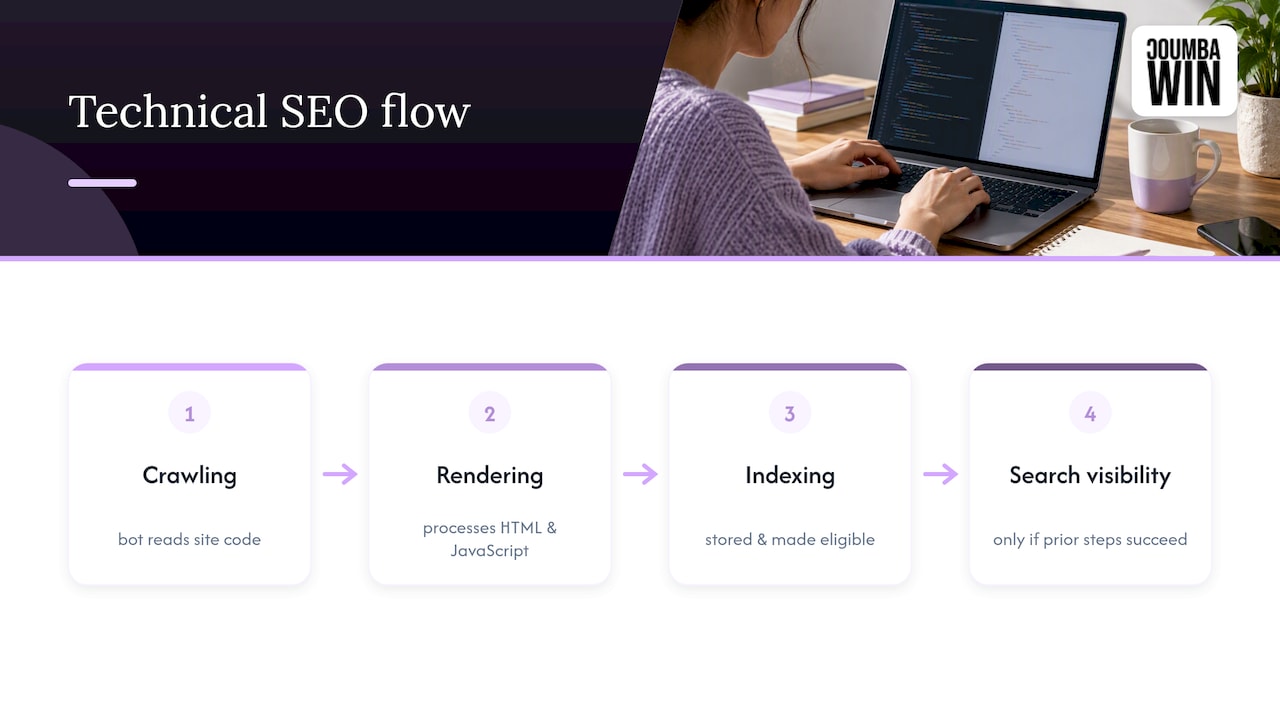
Technical SEO covers the infrastructure work that makes those three steps happen smoothly: things like site speed, mobile compatibility, clean HTML, structured data, and server configuration. According to Search Engine Land’s guide, technical SEO is the process of optimizing a website’s infrastructure so search engines and AI systems can efficiently crawl, render, index, and cite content. That last word, cite, matters more every month as AI tools start pulling answers straight from web pages instead of sending clicks.
This is different from on-page SEO (your keywords, headings, and content quality) and off-page SEO (backlinks and brand mentions). Think of it this way: on-page SEO is what you say, off-page SEO is who vouches for you, and technical SEO is whether anyone can even get through the front door to hear you talk.
Machine-readable HTML matters here too. A search engine bot doesn’t “see” your site like a human does. It reads code. If your important content is buried in a JavaScript framework that never renders properly, or your server throws errors, the bot walks away confused, and so does any AI system trying to summarize your page. Clean structure, working links, and a server that responds quickly aren’t nice extras. They’re the price of entry.
Why technical SEO matters now, for search and for AI
Here’s the thing nobody tells beginners: a page has to be indexed before it can rank for anything. Not “rank well.” Rank at all. If Google or Bing hasn’t indexed your page, it’s invisible, full stop. All that keyword research and content polish? Wasted, because the page isn’t even in the running.
Then there’s the newer wrinkle: AI retrieval. Tools that generate AI answers pull from pages that are clean, accessible, and easy to parse. Per Semrush’s technical SEO checklist, the same fundamentals (crawlability, clean HTML, schema, sitemaps) that help traditional search engines find and understand your pages are what make your content available to AI systems too. It’s a dual-purpose job now: bots need to crawl you, and retrieval systems need to be able to parse you cleanly.
The business impact is straightforward. Indexed, well-structured pages are the ones eligible for rich snippets, featured answers, and AI citations. Pages stuck in crawl limbo or buried under indexing errors don’t get any of that, no matter how good the writing is. If you’re a marketer trying to prove SEO value to a founder or boss, this is your headline point: fix the plumbing first, because that’s what determines whether anything else you do can be seen at all.
Crawling basics: how bots find your pages (and how they get lost)
Picture a search engine bot as a slightly overwhelmed guest at a party with way too many rooms. Discovery is how it finds a URL exists (through links, sitemaps, or a “hey, come check this out” ping). Crawling is it actually walking into the room. Rendering is it turning on the lights to see what’s really there, JavaScript and all.
Two small files run most of this traffic control. Your robots.txt file tells bots which sections they can enter, and a stray “Disallow: /” here can lock an entire site out of search results by accident. Your XML sitemap is basically a guest list, handing bots a tidy roster of URLs you actually want indexed. Common mistakes: sitemaps stuffed with broken or noindexed URLs, or a robots.txt file that blocks CSS and JS the bot needs to render the page properly.
JavaScript-heavy sites deserve extra attention. If your content only appears after JS executes, and the bot’s renderer struggles or times out, that content might never make it into the index. Server-side rendering (SSR) or prerendering solves this by serving a fully formed HTML page on first request, no JS gymnastics required.
You can check how this is going in Search Console’s Crawl Stats report and basic log files, which show what’s actually being crawled and how often (Search Console).
Watch out for these classic crawl traps:
- Faceted navigation that generates thousands of near-duplicate filtered URLs.
- Infinite scroll pages that never expose a crawlable link to “page 2.”
- Parameter explosion from tracking tags or session IDs creating endless URL variations.
Pro Tip: Check your robots.txt file today. It takes two minutes and it’s the single most common accidental self-sabotage in technical SEO.
Indexing directives: noindex, canonical tags, and getting them right
Crawlability and indexability are two different things, and mixing them up trips up a lot of beginners. A page can be perfectly crawlable and still never get indexed if you’ve told search engines not to bother. That’s what the noindex directive does: it’s a clear “don’t list this one” instruction, useful for thin pages, internal search results, or duplicate content, but disastrous when it accidentally ends up on your homepage after a site migration.
Canonical tags solve a related problem: telling search engines which version of a page is the “real” one when duplicates exist (think product pages with tracking parameters, or the same content reachable through two URLs). Get this wrong and you can end up telling Google to ignore the page you actually want ranked.
Quick checklist for indexing health:
- Use the URL Inspection tool in Search Console to see exactly how Google has indexed a specific page.
- Check the Pages report for patterns like “Crawled, currently not indexed.”
- Remove noindex tags left over from staging or development environments.
- Audit canonical tags after any redesign or URL structure change.
- Watch for redirect chains, since multiple hops (301 to 301 to 301) waste crawl budget and can delay indexing entirely.
Status codes matter here too. A clean 301 redirect passes signals efficiently. A chain of three or four redirects, or a redirect that quietly resolves to a 404, confuses bots and can knock pages out of the index altogether.
Core Web Vitals: what they measure and how to fix them fast
Core Web Vitals are Google’s way of measuring whether your page actually feels good to use, and they come down to three metrics. LCP (Largest Contentful Paint) measures loading speed. INP (Interaction to Next Paint) measures responsiveness when someone clicks or taps. CLS (Cumulative Layout Shift) measures visual stability, aka whether the “buy now” button jumps right as someone tries to tap it.
The ‘good’ thresholds measured at the 75th percentile of visits define qualitative targets for LCP, INP, and CLS performance to provide a good user experience, according to Web. That 75th percentile detail matters: it means three out of four visits need to hit that bar, not just your best-case test load.
The usual culprits behind bad scores: huge unoptimized images, render-blocking JavaScript loading before anything useful appears, and layout shifts caused by ads or fonts loading late. High-impact fixes, roughly in order of effort versus payoff: compress and properly size images, defer or async non-critical JavaScript, inline critical CSS, and reserve space for images and ads before they load.
Lab tools like PageSpeed Insights and Lighthouse are great for testing changes before you ship them, but field data (from the Chrome UX Report, or CrUX) reflects what real visitors actually experience, which is what Google uses for ranking purposes (Web Vitals field data guidance). If you want ongoing visibility into real-user performance, the web-vitals JavaScript library lets you collect and aggregate that data yourself.

Site architecture and internal linking that actually help
Good site architecture is basically good party planning: put the important stuff where people (and bots) can find it fast. Keep your priority pages within about three clicks of the homepage, and group related content into clear topic clusters rather than scattering it randomly.
A hub-and-spoke internal linking pattern works well here: one strong pillar page links out to related subpages, and those subpages link back up. Keep anchor text descriptive rather than a repetitive “click here” on every link. Our piece on how site structure affects growth digs into how this connects to conversion, not just crawlability.
Quick rules to live by:
- Avoid orphan pages with zero internal links pointing to them.
- Use breadcrumbs so both users and bots understand hierarchy at a glance.
- Write semantic HTML (proper heading tags, not just bold text pretending to be a heading).
- Don’t bury cornerstone content five folders deep in your URL structure.
HTTPS, redirects, duplicate content, and the other essentials
A handful of checklist items show up in every technical SEO guide for good reason: they’re foundational, they’re often overlooked, and fixing them is usually cheap.
- Run your site on HTTPS with a valid certificate. Let’s Encrypt offers free TLS certificates if you don’t already have one configured.
- Clean up redirect chains and fix stray 404 errors, redirecting old URLs directly to their new destination in one hop, not three.
- Use canonical tags consistently to handle duplicate content and paginated series, so search engines know which version to index.
- Add basic schema markup (Article, Product, FAQ, or Organization types are common starting points) to help search engines and AI systems understand what a page is actually about.
- Test mobile responsiveness thoroughly, since Google indexes the mobile version of your site first. Our mobile UX guide covers practical responsive design choices that also help performance scores.
None of these are glamorous. All of them are the difference between a site that’s technically sound and one quietly bleeding visibility.
Your first-week checklist: tools and quick wins
You don’t need a dozen tools to get started, just a few reliable ones. Google Search Console shows indexing status, crawl errors, and search performance. PageSpeed Insights and Lighthouse test page speed and Core Web Vitals in a lab setting. Chrome DevTools lets you inspect rendering issues directly. The web-vitals library gives you real field data over time.
Quick wins to knock out first, according to Ahrefs’ beginner’s guide:
- Check for and remove any accidental noindex tags.
- Submit (or resubmit) your XML sitemap in Search Console.
- Confirm HTTPS is active sitewide, not just on the homepage.
- Compress oversized images before they tank your LCP score.
- Strip out unused or render-blocking JavaScript.
How to prioritize when you’ve got limited time or dev hours:
- Fix indexation and crawlability issues first. These are binary problems (indexed or not).
- Tackle Core Web Vitals next, since performance affects both users and rankings.
- Move on to architecture cleanup and schema markup once the foundation is solid.
Ahrefs also notes that prioritization matters because indexation problems and Core Web Vitals produce outsized returns compared with low-impact, speculative technical changes. Fix the big stuff before you chase the small stuff.
How design decisions shape technical SEO outcomes
Design and technical SEO aren’t separate lanes, they’re the same road. A bloated hero image, an unoptimized font load, or a janky animation can tank your Core Web Vitals just as fast as bad code can. At Coumba Win, technical performance gets built into design decisions from the start rather than patched in afterward, because a beautiful site that loads slowly or shifts around while loading isn’t actually doing its job.
Motion and 3D elements are a great example of this trade-off, and our breakdown of 3D in web design covers exactly where those choices help versus where they quietly wreck your LCP and CLS scores.
Good design and good technical SEO are the same conversation, just wearing different hats.
— Coumba Evelyn
Should you fix this yourself or call in a developer?
Marketers can safely handle sitemaps, Search Console checks, and image compression without breaking anything. Server-side rendering, complex JavaScript framework issues, and server configuration usually need a developer. When you hand off a ticket, include the specific URL, the exact error or symptom, and a screenshot: vague tickets get vague fixes.
How Coumba Win can help you fix the technical stuff
If reading all this made your eyes glaze over a little, that’s normal, and also exactly why design and technical SEO work better together than apart. Specialized agencies may pair SEO optimization with web design and development and accessibility audits, so performance fixes get built into the site itself instead of bolted on as an afterthought.

A discovery call is the easiest next step: you walk us through what’s currently live, we flag the technical issues worth fixing first, and you leave with a clear sense of what a rebuild or audit would actually involve. Check out our work and services to see how that plays out in practice.
Where to go for the official details
For deeper reading, check Google Search Central style guidance, Web Vitals documentation, and this partner primer on technical SEO.
Sources
FAQ
What does technical SEO consist of?
Technical SEO consists of the infrastructure work that lets search engines and AI systems crawl, render, and index your pages, including site speed, mobile-friendliness, secure connections, structured data, and clean URL structures. It’s distinct from on-page content and off-page link building, both of which depend on technical SEO working first.
What are the 5 important concepts of SEO?
Most guides point to crawlability, indexability, site architecture, page experience (including Core Web Vitals), and content relevance as the core building blocks. Technical SEO covers the first four directly, while content strategy and links handle relevance and authority.
What is the 80/20 rule for SEO?
There’s no official rule specific to SEO, but the idea people usually mean is that a small set of fixes, mainly indexation and Core Web Vitals issues, tend to produce the largest visibility gains. Fixing crawl errors or a stray noindex tag typically matters far more than smaller cosmetic tweaks.
Do I need to fix technical SEO before writing content?
Yes, because a page that isn’t crawlable or indexable can’t rank no matter how strong the content is. Check indexing status in Search Console before investing heavily in new content for a page.
How often should I check Core Web Vitals?
Checking monthly, or after any major site change, catches regressions before they hurt rankings. Field data in Search Console updates on a rolling basis, so give it a few weeks after a fix before judging results.