
Design System Governance for Startups: Who Decides What
Design System Governance for Startups: Who Decides What
Design system governance is the set of roles and processes that decide how your shared library of components changes after it exists. For a startup, the short answer is this: name one owner, write down who decides what, give every change one door to walk through, and review the system on a fixed rhythm. That is enough to keep a young product from turning into five slightly different products. And if you would rather not carry that setup alone, we build and maintain these systems with founders.
TL;DR
- Governance is roles, decision rights and a change process. Figma describes it as what decides how a library changes once teams start using it.
- Most teams start centralized (one team approves everything) and move toward a hybrid model as they grow.
- Assign ownership by decision type: brand-level calls stay with a core owner, product-level calls move faster with the product team.
- One intake channel, visible review stages, a deprecation window and a regular maintenance rhythm keep the system from drifting.
- Start small. A one-page rulebook that people actually follow beats a thick process nobody reads.
Table of Contents
- What governance means (and why founders feel it late)
- Choosing a governance model
- Who owns what
- A change process that fits on one page
- Keeping the system from going stale
- Your first 30 days
- Where we come in
- Our perspective
- FAQ
- Sources
What governance means (and why founders feel it late)
You launch with a clean set of buttons, colors and type styles. Six months later, a new hire needs a card layout, nothing fits, and they build their own. Then another. Governance is the boring-sounding fix for that very ordinary story.
More formally, it is the rules, roles, workflows and measurement that control how a shared design system changes: how components and tokens (the named values for color, spacing and type) get approved, who can grant exceptions, and how drift is spotted.
The same source describes the failure as slow, not sudden. Teams ship in parallel, urgent exceptions pile up, local variants appear, and the system turns into reference material instead of the source of truth. The symptoms are easy to recognize: the same pattern in three slightly different versions, inconsistent token use, uneven accessibility.
Why it matters for growth specifically: Miro’s governance guide argues that fragmented experiences rarely start as design problems. They start as growth problems, when more products and channels mean more decisions made locally. Skipping a review costs nothing today. Figma notes it shows up months later, when nobody can explain why two similar components both exist.
Adoption is hard even for established companies. The zeroheight Design Systems Report 2025, as summarized by one practitioner, found only 10% of surveyed companies reported full adoption across all teams, and 40% reported wide adoption by most teams. Governance is the difference between a system that exists and one people use.
If you are still deciding whether you need a system at all, our guide to what a design system is is the place to begin.

Choosing a governance model
Three models cover most cases. Figma lists them as centralized, federated and hybrid.
| Model | How it works | Where it fits |
|---|---|---|
| Centralized | One dedicated team (or person) owns and approves every change | Newer, smaller organizations or small product portfolios |
| Federated | Designers across product teams share ownership and contribute directly | Several mature product lines with strong local designers |
| Hybrid | A core team owns foundations; product teams contribute within guardrails | Growing companies with multiple products |
The zeroheight models guide adds useful nuance: centralized suits smaller portfolios and can put one person accountable for design direction, while federated models often form organically from one or two designers and engineers. Hybrid pairs a committee that gives direction with a core team that builds libraries, coded components and documentation.
A stage-by-stage view from MagicPatterns: centralized holds up under about 20 designers across two or three products and strains once the central backlog becomes a bottleneck. Federated drifts without a final authority. Hybrid is the most common in mature product organizations, but falls apart without documented decision rights.
What this means for a startup: you probably have one to four designers and a handful of engineers. Start centralized, with one accountable person, and plan the move to hybrid when requests start queuing. Figma notes that most teams follow exactly this path.
Who owns what
Ownership is where most governance dies, usually because everybody assumes somebody else has it. Three practical moves:
Name a product owner for the system. UXPin’s maintenance checklist recommends one person with clear authority who manages the roadmap and prioritizes requests, backed by a design lead (visual language, interaction, accessibility) and an engineering lead (component architecture, code quality, releases). Put it in a RACI chart, which is simply a table of who is Responsible, Accountable, Consulted and Informed for each task.
Split decisions by type. Figma’s advice is to keep brand-level decisions, like base color tokens or renaming shared components, with the foundations owner, while team-level decisions, like a new card variant, move faster with the product team.
Spread the load when you can. HubSpot’s team rotated four designers onto its Canvas system team every six months, with weekly issue triage and weekly UI kit updates, aiming for every product designer to take a tour of duty. The reasoning: people who work on the product daily make the best shepherds.
In a larger federated setup, Acuity layers ownership with core system owners, product-area owners and specialists for areas like accessibility. Its lesson that travels down to startups: be explicit about what is fixed (accessibility constraints, token inheritance) and what is flexible (brand expression, product-specific recipes).
That flexible-versus-fixed line is also where brand work meets system work. If your visual language is not yet pinned down, creating a consistent visual brand language comes first.
A change process that fits on one page
The pattern across good processes is simple: one door in, visible stages, clear deciders.
- One intake channel. UXPin suggests proposals carry a summary, use case, priority, target product area and deadline.
- Visible status. Move requests through stages such as submitted, under review, needs more information, approved for design, approved for development, scheduled for release, or declined. People accept a “no” far better when they can see it.
- Decision rules. The product owner decides scope, the design lead decides patterns, the engineering lead decides feasibility.
- Triage. Sort each request as a bug, enhancement, new pattern or out of scope.
- Review against a checklist. HashiCorp publishes its component checklist: design, testing, documentation, release. Reviewers check foundations, UX solution, accessibility, code API, naming and token use. Stakeholders test for three to four days, then the team adds a changelog entry, publishes and announces.
- Match effort to size. Lattice sorted contributions into fixes, small enhancements and large enhancements, with a three-stage component lifecycle from exploratory to stable.
A question every contribution should answer: is this a one-off, or does it belong in the system? If another team will plausibly need it, it belongs. If not, let it live in the product and say so in writing.
Built-in accessibility checks belong in the review, not after it. One open contribution workflow, for instance, requires WCAG 2.2 AA accessibility tests to pass before a build counts as complete. WCAG is the widely used set of web accessibility guidelines, and AA is the level most organizations target.
Keeping the system from going stale
Maintenance is governance on a calendar. UXPin recommends weekly triage, biweekly design and engineering reviews, monthly backlog refinement and quarterly strategy talks, each time-boxed and aligned with sprints. For a small startup, a 30-minute weekly triage and a quarterly audit is a perfectly respectable start.
MagicPatterns’ maintenance guide frames the backbone as a component lifecycle (propose, review, build, document, release, measure adoption, deprecate) with an owner at each stage. For retiring components it suggests four steps: announce, provide a migration guide with before-and-after examples, allow at least one to two release cycles, then remove in a major version.
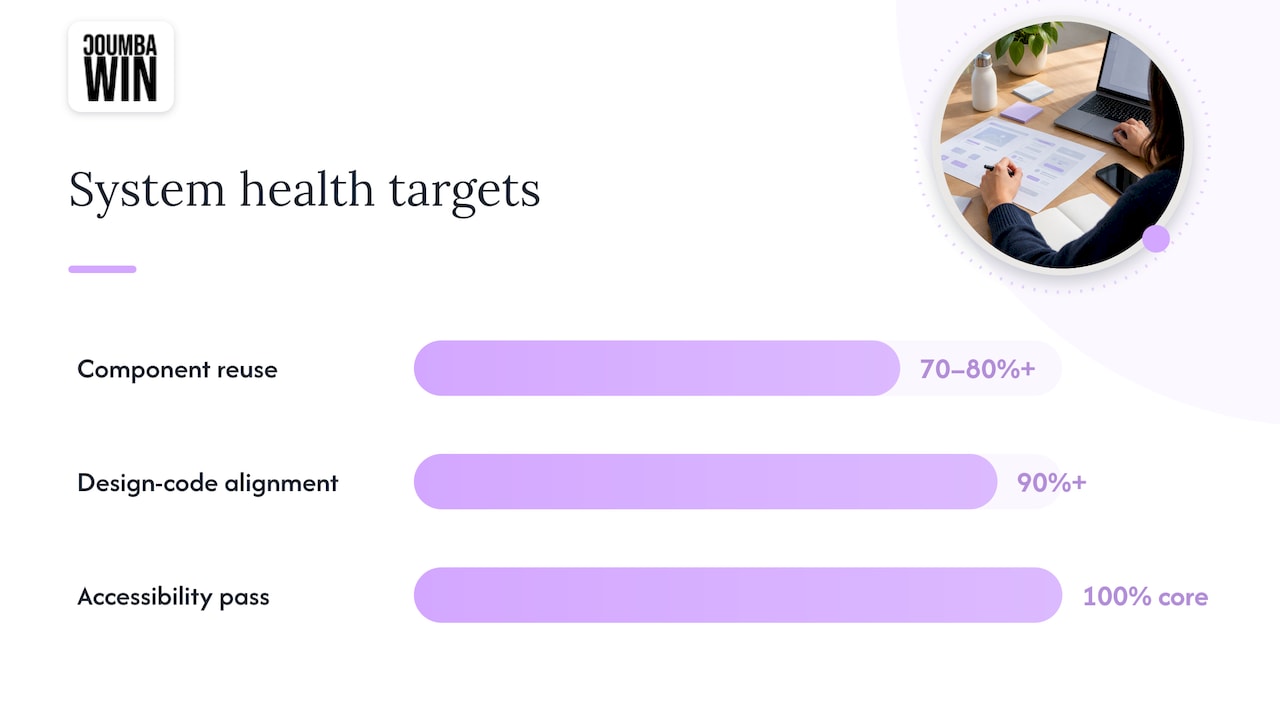
The same guide tracks a handful of health signals:
- Component reuse rate, with 70 to 80 percent or more for mature systems
- Design-to-code alignment, 90 percent or more
- Accessibility pass rate, 100 percent for core components
- Dependency freshness and overall adoption
Treat those as targets that come from one guide, not universal standards. Pick two you can measure now and add others later.
Proof that the effort pays: Zendesk’s Greenhouse team reported a clear contribution process supporting 40 teams, with tracked 30% efficiency gains in design time and an estimated 33% in engineering time. They got there by turning the governance meeting into a round table, redefining roles and cadence, and adding Slack channels and weekly office hours.
One more honest lesson from a small-team case study at Lilt: office-hours attendance fell off once teams could work through the system on their own, and product managers had to protect maintenance time in sprints. Maintenance capacity has to be planned, or it gets eaten by features.
Your first 30 days
- Write down who owns the system and who backs them up.
- List what is fixed (tokens, accessibility rules) and what is flexible (brand expression, product recipes).
- Open one request channel and publish the status stages.
- Hold a weekly 30-minute triage.
- Pick two health metrics and schedule a first quarterly audit.
- Keep your assets organized; our notes on managing design assets for a growing startup help here.
Governance also depends on people talking across disciplines, which we cover in cross-functional design collaboration.
Where we come in
We are a design partner for startups, and we do UI and UX design, web design and development, Webflow development, accessibility audits, branding and ongoing design support as you scale. If you want a system that is custom to your product, not a generic template, and someone alongside you as it grows, take a look at our web design and development services, or see our Webflow work.
We work closely with founders, so the rules above get written for your team and your stage, not copied from a company ten times your size.
Our perspective
Most founders hear “governance” and picture meetings. We picture a system that stays yours.
We design for startups that treat design as a competitive advantage, and a competitive advantage that quietly forks into five versions is not one. That is why we reject generic templates and AI-generated design: a system only works when it reflects how your product and your customers actually behave.
Our view is that governance should be small and early. One owner, a few clear decision rights, one door for requests. Then grow it as your team grows, with design support that scales alongside you.
Pair that with accessibility audits and a consistent brand language, and the system becomes something your whole team is proud to use.
Coumba Evelyn
FAQ
What is a design system governance model?
It is the structure that decides who owns the system and who can change it. The common ones are centralized, federated and hybrid. Startups usually begin centralized and shift to hybrid as more teams contribute.
How is governance different from maintenance?
Governance sets the roles, rules and approval paths. Maintenance is the recurring work done inside them: triage, audits, updates and deprecations. You need both, and the maintenance calendar is easiest to keep when the rules are already written.
When should a startup start governing its design system?
As soon as more than one person ships UI from the system. At that point, exceptions and local variants start to appear. A one-page ownership and request process is enough at first.
Who should own the design system in a small team?
One named person with clear authority, supported by a design lead and an engineering lead. Document responsibilities in a RACI chart so nothing is assumed.
Sources
- Design System Governance: Structuring Ownership | Figma
- Design System Governance: How to Keep Design and Code in Sync | Miro
- What Is Design System Governance? Framework, Roles, Metrics
- Design Systems Governance: One Team, 60+ Products
- Design system governance models and which is right for your organization | zeroheight
- Scaling Design Systems Across Teams
- Checklist for Design System Maintenance | UXPin
- By the people, for the people: Keeping your design system evergreen | HubSpot
- Federated governance: how to scale a design system across products
- HashiCorp Design System new component checklist
- Contribution workflow
- Lattice design system: a systematic approach to collaboration
- Design System Maintenance: How to Prevent Drift and Decay
- Zendesk Greenhouse design system
- A design system that made product teams faster