Startups: Checklist First SEO Site Migration That Preserves Rankings

Startups: Checklist First SEO Site Migration That Preserves Rankings
Document your baseline before touching anything, map every URL to a 1:1 301 redirect, and kill the staging noindex tag the second you launch. Follow Google Search Central’s site-move framework and expect some ranking wobble for a few weeks even when you do everything right. Treat this checklist like the seatbelt, not the suggestion, since a single forgotten redirect can cause significant loss in organic traffic.
TL;DR:
- Accurate URL mapping and a comprehensive redirect plan are crucial, as a single incorrect redirect can significantly impact organic traffic.
- Conduct thorough testing on staging with strict noindex and access restrictions, verifying GA4, structured data, redirects, and navigation before launch.
- Keep redirects active for at least one year, especially when external links may still point to old URLs, to preserve link equity.
- Post-launch, monitor rankings daily for at least two weeks, focusing on indexing, Crawl status, and traffic patterns to catch issues early.
- Integrate design, SEO, and navigation decisions from the start to avoid critical errors that cause traffic drops, rather than treating them as separate tasks.
Table of Contents
- What Is SEO Site Migration Planning?
- How Do You Test a Site Before Launch?
- What’s the Right Way to Map URLs and Redirects?
- What Should You Check on Launch Day?
- How Long Does It Take to Recover Rankings After Migration?
- What Causes Traffic Loss After a Migration?
- Coumba Win’s Take on Migrations That Don’t Break
- Does a Site Migration Affect Internal Linking?
- How Do You Update Backlinks After a Site Migration?
- What Happens When You Change CMS or Site Architecture?
- How Should You Communicate a Migration to Stakeholders?
- Do You Need to Update Structured Data and Metadata?
- Does Mobile Optimization Matter During a Migration?
- Why the Conventional Migration Advice Misses the Point
- Ready to Migrate Without the Guesswork?
- Sources
- FAQ
What Is SEO Site Migration Planning?
Every site migration SEO plan starts with numbers you can look back at when things go sideways, which they occasionally will even on a clean build.
Pull three exports before a single line of code changes: your Google Search Console performance report (queries, clicks, impressions, average position, going back at least 16 months), your GA4 traffic and conversion data by landing page, and a full rank tracker snapshot for your priority keywords. These aren’t just archival. They’re your proof, three weeks post-launch, of whether a traffic dip is normal migration noise or an actual problem you caused.
Here’s the sequencing that keeps a migration from becoming a fire drill:
- Set success metrics first. Decide what “recovered” means before launch. Is it organic sessions within 10% of baseline by week six? Is it top 20 keywords holding position? Write it down. Vague goals produce vague postmortems.
- Crawl the entire existing site. Tools like Screaming Frog or Sitebulb will surface every indexable URL, every redirect already in place, and every orphaned page you forgot existed. Export the full URL list with status codes, titles, and word counts.
- Pull a backlink export. Ahrefs, Semrush, or Moz will show you which pages are actually earning links. This list becomes your triage priority when something breaks.
- Identify your high-value pages. Rank every URL by organic traffic and conversions, then isolate the top 50 to 200. These get manual verification on launch day. Nobody has time to manually check 40,000 URLs, but your top 100 pay the bills.
- Build the redirect mapping spreadsheet. Columns should include old URL, new URL, redirect type, priority tier, and a “verified” checkbox. This single document is the backbone of the entire migration.
- Write the rollback plan. Know exactly what “abort” looks like: DNS revert steps, who has access, and how fast you can flip back if launch day goes wrong.
A few operational details get skipped constantly and cause outsized damage:
- Lower your DNS TTL to 300 seconds or less at least 48 hours before launch, so a rollback (if needed) propagates in minutes instead of hours.
- Take full backups of the old site’s database, files, and DNS records before any changes.
- Align every stakeholder, developers, marketing, leadership, on the exact launch date and time zone. A migration launched at 4:00 PM on a Friday with nobody watching is a decision you’ll regret by Monday.
- Confirm who owns Search Console and GA4 access on both the old and new properties. You’ll need both during the transition.
Pro Tip: Screenshot your Search Console Performance graph the morning of launch. When someone asks two weeks later “was it always this volatile,” you’ll have a timestamped answer instead of a guess.
How Do You Test a Site Before Launch?
Staging environments exist to catch mistakes before Google ever sees them, but they cause almost as many problems as they prevent when handled sloppily.
The single most common, entirely preventable failure in any migration is a noindex tag that gets left on in production. Semrush’s migration research flags this as one of the top causes of post-launch traffic collapse. Staging should always run with a sitewide noindex directive and a password wall or IP restriction blocking public and bot access, full stop. If you need Googlebot to crawl staging for legitimate testing, use a temporary, time-boxed allowlist rather than opening the whole environment.
Before sign-off, run through this sequence:
- Install and verify GA4 tracking, including your tag manager container and any custom event tracking. Test in GA4’s DebugView, not just by eyeballing the dashboard days later.
- Run a full technical crawl of staging. Check Core Web Vitals scores, validate structured data against Schema specifications, confirm hreflang tags if you run multiple language versions, and check that images carry proper alt text and aren’t serving at three times the file size they need to.
- Test redirects on staging wherever the environment allows it. Not every setup supports this, but when it does, catch broken mappings before they go live instead of after.
- Audit canonical tags. Every staging page’s canonical should already point to the intended production URL, not to itself and not to the old domain.
- Check internal links. Staging should link internally using the new URL structure, not a patchwork of old paths waiting on redirects to save them.
Before handoff, developers and SEO leads should walk through a shared checklist together, live, not over Slack. Things that look fine in a screenshot often break under an actual crawl.
- [ ] Noindex confirmed on all staging pages
- [ ] GA4 and tag manager firing correctly
- [ ] Core Web Vitals within acceptable thresholds
- [ ] Structured data validates without errors
- [ ] Redirect map spreadsheet fully populated
- [ ] Canonical tags point to correct production URLs
If your new build runs on a headless CMS, the testing burden gets heavier. Baby Love Growth’s headless CMS SEO checklist is worth running alongside your own staging audit, since rendering and metadata injection work differently than on a traditional CMS.
What’s the Right Way to Map URLs and Redirects?
Redirect strategy is where most site migration SEO plans quietly fall apart, and it’s almost always the same mistake: a catch-all redirect sending every old URL to the new homepage.
Search engine guidance on redirects is blunt about this: redirecting everything to one destination behaves like a soft 404 in Google’s eyes. You lose the specific relevance signal that page had, and you tell Google the old content simply doesn’t exist anymore. Your redirect map needs a genuine 1:1 relationship wherever a reasonable new-URL equivalent exists.
Your mapping spreadsheet should include these columns at minimum:
- Old URL (full path, not truncated)
- New URL (the exact destination)
- Redirect type (301 in the vast majority of cases)
- Content match confidence (exact, close, or “no good match”)
- Priority tier (based on your traffic and backlink data)
- Verification status
Implement redirects server-side, not through a meta refresh or JavaScript redirect, both of which Google crawls less reliably and users notice as janky. Watch specifically for redirect chains, where URL A redirects to B, which redirects to C. Googlebot will follow up to 10 hops, but every hop dilutes the signal and slows the crawl. Collapse chains down to a single hop: A to C, directly.
Not every old URL deserves a redirect. If a page is genuinely gone with no equivalent content on the new site, serve a proper 410 (Gone) status instead of forcing a fake redirect to an unrelated page. It’s a cleaner signal to Google than a redirect nobody believes.
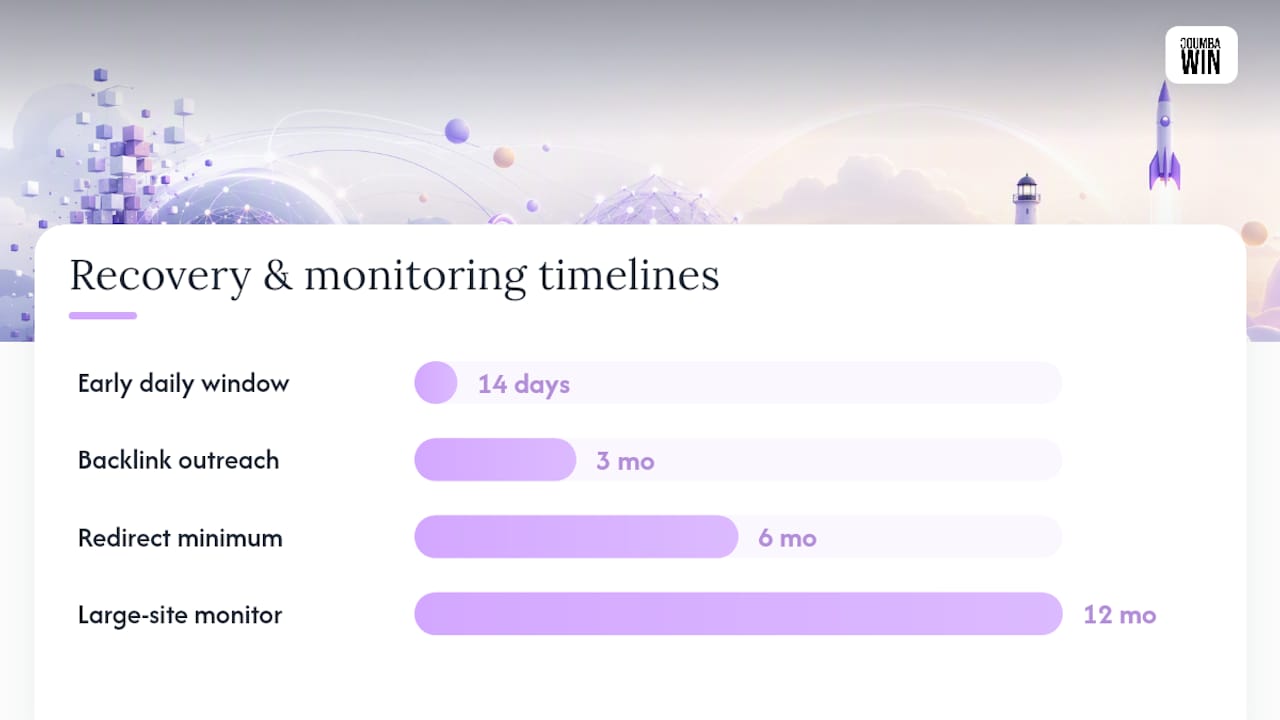
How long should redirects stay live? Google’s own guidance on the Change of Address tool forwards signals for 180 days on domain-level moves, but that’s a floor, not a target. Keep redirects active for at least 12 months, and longer if the old domain still holds any external link equity. Pulling them early is one of the more common causes of a late, mysterious traffic dip six months after everyone assumed the migration was “done.”
Testing at scale matters as much as the mapping itself. Run your finished redirect map through Screaming Frog in list mode to confirm every URL returns a 301 and lands on the intended destination, then manually spot-check your top 50 highest-traffic pages by hand. Automated tools miss context; human eyes catch it. And once redirects are live, update your internal links to point directly at the new URLs. Relying on redirects forever for internal navigation adds unnecessary latency and an extra hop your own site controls completely.
Pro Tip: Sort your redirect spreadsheet by “content match confidence” before launch. Every row marked “no good match” is a page that needs a human decision, not an automated guess, before you go live.
What Should You Check on Launch Day?
Launch day rewards decisiveness. A slow, staggered rollout where some pages go live Tuesday and others trickle out over the following week creates a confusing mixed signal for crawlers trying to figure out which version of the site is real. A single, clean cutover is almost always the better bet.
Work through this sequence in order:
- Remove every noindex tag and robots.txt block the moment the new site is live. Check the actual rendered HTML, not just the CMS setting, since some platforms cache old meta tags.
- Verify 301 status codes are firing across your priority URL list using a quick crawl or spot-check with
curl -I. - Submit your new XML sitemap to Search Console and request indexing on your highest-priority pages individually.
- Confirm Search Console and GA4 ownership on the new property, and check that data is actually flowing in real time.
- Run a full site crawl looking specifically for 4xx and 5xx errors that weren’t present on staging.
- Document everything with timestamps: what changed, when, and what the crawl and analytics dashboards looked like within the first hour.
A short launch-day punch list to keep visible on a shared screen:
- [ ] Staging noindex and robots blocks removed
- [ ] Redirects verified returning 301, not 302 or 200
- [ ] New sitemap submitted in Search Console
- [ ] Priority URLs manually requested for indexing
- [ ] GA4 and Search Console confirmed receiving data
- [ ] Full crawl run, zero unexpected 4xx/5xx
- [ ] Stakeholders notified with launch summary
Fast, decisive cutovers using edge or CDN-level routing tend to avoid the DNS propagation delays that slower, DNS-only switches can create, which matters most in that first hour when Googlebot might hit either version of the site depending on which server answers the request. Whatever your rollback plan says, keep it within arm’s reach for the first 24 hours. You probably won’t need it. You’ll be glad it’s there if you do.
How Long Does It Take to Recover Rankings After Migration?
Recovery timelines depend heavily on site size, and Google’s own guidance puts medium sites at a few weeks of processing time for moved URLs, while large eCommerce platforms should plan for three to six months of preparation and a monitoring window that can stretch up to a year.
The first 14 days deserve daily attention, not weekly check-ins. Watch these specifically:
- Search Console Coverage report for spikes in “not found” or “excluded” URLs
- Impressions and clicks trending against your documented baseline
- GA4 sessions by landing page, compared against pre-migration numbers
- Crawl stats report for sudden drops in pages crawled per day
After the first two weeks, drop to a weekly cadence and shift focus to your top 50 keyword watchlist. Set a threshold for what triggers investigation, a drop of more than five positions on a page-one keyword, for instance, rather than reacting to every daily fluctuation. Rankings move on their own even without a migration; the goal is separating signal from noise.
Temporary ranking fluctuations after a move are expected. Google’s own documentation notes that medium sites typically show changes for a few weeks, with larger sites needing longer. Fast, decisive cutovers reduce the odds of a confusing mixed crawl signal during that window.
Indexation is the other pillar worth tracking daily early on. Use the URL Inspection tool in Search Console on your highest-priority pages to confirm Google has actually crawled and indexed the new URL, not just discovered it. A page stuck on “discovered, currently not indexed” for more than a week or two after launch is worth a manual indexing request.
Backlink outreach is slower work but pays off over months, not days. Pull your top 50 to 100 referring domains from your original backlink export and reach out asking site owners to update the link to your new URL directly. This won’t happen for most links. Redirects will carry the weight for the ones that never get updated, which is exactly why they need to stay active well past the 180 day floor. Semrush’s phased checklist recommends treating this outreach as an ongoing background task through the first quarter after launch, not a one-time sprint.
What Causes Traffic Loss After a Migration?
Almost every serious traffic collapse after a migration traces back to one of three causes, and matching the symptom to the cause fast is the entire game.
Semrush’s research identifies this as the single most common preventable failure. Run curl -I against a sample of pages and look at the raw HTML meta tags, not the CMS toggle, which sometimes lies.
Partial traffic drop concentrated on specific page types: This usually means broken or missing redirects for that URL pattern. Re-run your Screaming Frog list-mode crawl against just that segment and check for 404s or unintended redirect chains.
Here’s the diagnostic sequence to run, in order:
- Confirm indexing status with URL Inspection on five to ten affected pages.
- Check live HTML source for noindex tags and robots.txt blocks.
- Crawl the affected URL segment for status codes.
- Check canonical tags for accidental self-referencing errors pointing to the wrong domain.
- Verify sitemap submission actually includes the affected URLs.
Fix recipes are usually fast once the cause is identified: restore the correct redirect, strip the noindex tag, resubmit the sitemap, or correct a mistaken canonical. Most of these are same-day fixes once diagnosed.
Know when to roll back versus iterate. If the launch broke something fundamental, checkout flow, core navigation, a full DNS revert is the safer call. If it’s isolated to SEO signals like redirects or metadata, fix forward instead of rolling back the entire site.
Pro Tip: Keep a “known issues” doc updated in real time during the first 48 hours. Half of migration panic comes from three people independently discovering the same bug and not knowing someone’s already on it.
Two edge cases worth flagging: CDN misconfigurations can serve cached old-site responses for hours after DNS has fully propagated, and there’s currently no centralized “change of address” mechanism for AI models and language-model-driven discovery tools, so keeping your brand’s entity signals and off-site references updated helps those systems catch up on their own timeline.
Coumba Win’s Take on Migrations That Don’t Break
Design, UX, and SEO get treated as three separate workstreams on most migrations, and that’s exactly why they go wrong. They should be run as one coordinated build: the same team mapping information architecture also owns the redirect logic, so a navigation redesign never ships without its SEO consequences already accounted for.
The pattern that causes the most damage isn’t a bad redirect. It’s a beautiful new site that nobody stress-tested against the old one’s actual traffic distribution. A homepage redesign that buries a page earning 40% of organic conversions three clicks deeper is a design decision with an SEO cost nobody flagged in time.
For a startup weighing whether to run a migration in-house or bring in outside help, the honest trade-off is bandwidth, not capability. A technically skilled internal team can absolutely execute this checklist. What often lacks is the time to also handle every design decision, stakeholder update, and monitoring cycle at once during launch week.
Does a Site Migration Affect Internal Linking?
Internal links carry as much weight in a migration as redirects do, and they get far less attention. Every internal link on your old site pointed to a URL that may no longer exist in the same form, and relying on redirects to patch every one of those links is a workaround, not a fix.
Update internal links to point directly at final destination URLs before or immediately after launch, rather than letting them ride through a redirect indefinitely. Each extra hop adds latency and a small amount of risk if that redirect ever gets removed or misconfigured down the line.
Navigation structure deserves particular scrutiny. If the migration includes a new information architecture, and most do, some pages that used to sit two clicks from the homepage might now sit four clicks deep. Crawl depth affects how often Googlebot revisits a page and can be read as reduced importance if the change is severe. Site architecture decisions have measurable effects on both crawl behavior and how people actually find their way to conversion pages, so treat navigation redesign as an SEO decision, not just a UX one.

Breadcrumbs, footer links, and related-content modules all need the same audit. A footer link pointing to a URL that no longer exists in the new structure, redirect or not, is worth fixing at the source rather than leaving for the redirect map to quietly absorb forever.
How Do You Update Backlinks After a Site Migration?
Backlinks don’t migrate themselves, and the redirect map only carries their value part of the way. Pull your full backlink export before launch using Ahrefs, Semrush, or Moz, then sort by referring domain authority and link volume to find the pages actually worth chasing.
Outreach to update links directly is slow and has a modest success rate. Most webmasters won’t respond, and plenty of sites linking to you haven’t been updated in years regardless of the request. Still, the ones who do respond matter disproportionately, since these tend to be your highest-authority referring domains, exactly the links you can least afford to lose the full value of through an extra redirect hop.
Prioritize outreach in this order: first, links pointing to pages that no longer have a clean 1:1 redirect match. Second, your top 20 to 30 referring domains by authority, regardless of which page they link to. Third, any link from a source that’s clearly still actively maintained, since a fresh response is more likely.
Broken link monitoring should continue for months after launch, not just in the first week. New backlinks sometimes arrive pointed at the old URL structure simply because a site owner copied an outdated reference or bookmark. Set a recurring quarterly check against your backlink export to catch these before they accumulate into a real problem.
What Happens When You Change CMS or Site Architecture?
Switching content management systems during a migration multiplies the risk, because you’re changing the underlying HTML output at the same time as the URLs, the navigation, and often the hosting environment all at once.
Headless CMS platforms in particular introduce rendering questions that a traditional CMS never had to answer. Content gets pulled via API and rendered client-side or server-side depending on your framework, and metadata, canonical tags, and structured data need explicit configuration rather than arriving automatically through a theme. The headless CMS SEO checklist from Baby Love Growth is a solid technical reference for confirming your new stack actually outputs what Googlebot expects to see.
Architecture changes, restructured URL folders, a new taxonomy for categories, a flattened or deepened navigation, deserve their own mapping exercise separate from the basic redirect spreadsheet. Ask whether the new structure genuinely serves users better or whether it’s a stylistic preference that happens to break several years of established crawl patterns.
Whatever platform you land on, preserve URL patterns wherever the new architecture allows it. A URL that survives the migration unchanged needs no redirect logic at all. Every URL you can keep stable is one less row in your mapping spreadsheet and one less point of failure on launch day.
How Should You Communicate a Migration to Stakeholders?
A migration that surprises leadership on launch day is a communication failure before it’s ever a technical one. Set expectations early: share the projected timeline, the expected temporary ranking fluctuation, and the specific metrics you’ll use to define success, before anyone starts asking why traffic looks different in week two.
Internal stakeholders need a simple, honest framing: some volatility is normal and expected, backed by Google’s own documentation on typical migration timelines. Set that expectation before launch, not defensively after a dip shows up on someone’s dashboard.
External communication matters too, especially for a business with an active customer base or subscriber list. A brief note about upcoming changes, timed close to launch rather than weeks ahead where people forget, reduces the volume of “is your site broken” messages you’ll field in the first 48 hours. For businesses undergoing a broader redesign alongside the technical migration, understanding the actual business impact of the change helps frame internal conversations around what’s really at stake and why the checklist discipline matters.
Document decisions as you make them; a shared log of what changed, when, and why, saves hours of reconstruction later if a stakeholder asks about a metric shift three months out.
Do You Need to Update Structured Data and Metadata?
Structured data doesn’t automatically transfer during a platform change, and metadata that worked perfectly on the old site can silently break on the new one if title tag templates or schema markup aren’t rebuilt with the same care as the visual design.
Every page carrying schema markup, product listings, articles, FAQ blocks, review snippets, needs that markup rebuilt and validated on the new platform, following the specifications at schema.org. Run new pages through a structured data testing tool before launch, not after, since a broken schema block often fails silently with no visible symptom beyond a missing rich result weeks later.
Title tags and meta descriptions deserve a direct audit against your old-site export, not a fresh rewrite from scratch. If a title tag was earning strong click-through rates on the old site, preserve that pattern on the new URL unless you have a specific, tested reason to change it. Migrations are not the moment to also relaunch your entire on-page copy strategy; that’s a separate project with its own testing cycle.
Canonical tags need particular attention post-launch. Confirm every new page’s canonical points to itself on the new domain, not back to the old URL, and not to a staging environment address that got copied over by accident during the build.
Does Mobile Optimization Matter During a Migration?
Google indexes mobile content first, which makes mobile rendering the actual test that matters during any migration, not an afterthought to check once the desktop version looks right.
Confirm the new site’s mobile experience renders every element that carries SEO weight, structured data, canonical tags, meta descriptions, the same as desktop. Some CMS platforms serve stripped-down mobile templates that quietly drop schema markup or truncate meta descriptions, and that gap won’t show up unless someone specifically tests the mobile-rendered HTML, not just the visual layout.
Core Web Vitals scores frequently shift during a migration, sometimes for the better with a modern rebuild, sometimes worse if the new platform loads more scripts or larger images than the old one did. Test mobile page speed on staging using real device throttling settings, not just a desktop browser’s mobile preview mode, which understates real-world load times significantly.
Tap targets, viewport configuration, and font legibility all deserve a manual pass on an actual phone, not just a responsive design simulator. A redesign that looks sharp on a designer’s monitor can still ship with a mobile navigation menu that’s frustrating to actually use, which affects engagement signals Google increasingly factors into how it evaluates page quality.
Why the Conventional Migration Advice Misses the Point
Most migration guides treat SEO and design as sequential steps: build the site, then bolt on the redirects and metadata before launch. That ordering is backwards, and it’s the root cause of most of the traffic damage this article has walked through.
The teams that come through a migration clean are the ones who treated URL structure, navigation, and redirect logic as design decisions from day one, not a checklist appended after the visual work was done. A gorgeous new site that quietly demotes your highest-converting page to four clicks deep isn’t a design win with an SEO cost. It’s a design mistake that happened to also be an SEO mistake.
The conventional wisdom also overstates how much a perfect technical execution guarantees. You can nail every redirect and still see a few weeks of ranking noise, because that’s simply how Google’s re-crawl and re-evaluation process works on any site of meaningful size. What separates a smooth recovery from a prolonged one usually isn’t perfection. It’s how fast the team catches the one thing that actually broke, instead of guessing at five things that didn’t.
Prioritize the baseline data and the redirect map above everything else. Design polish can wait a week. A missing 301 cannot.
— Coumba Evelyn
Ready to Migrate Without the Guesswork?
Treat a site migration as a coordinated build, not a checklist handed off after the design is finished. Where some agencies separate the redesign team from the technical SEO work, running strategy, design, development, and launch monitoring as one connected engagement helps ensure redirect logic and navigation decisions get made together, before either one becomes a launch-day surprise.

An engagement typically covers the pre-migration audit and baseline capture, the actual design and development build, staged testing against the checklist above, and monitoring through the first weeks after launch when ranking volatility is most likely to show up. Startups moving fast toward a fundraising milestone or a product relaunch get a fixed launch window instead of an open-ended timeline that drifts. If your component library needs standardizing for a faster rebuild, the style guide and component system services can shorten that build phase considerably.
Start by reviewing Coumba Win’s services and requesting a scope conversation before you lock in a launch date. The earlier a design partner sees your redirect map, the fewer surprises you’ll be diagnosing during launch week.
Sources
Before executing any step in this checklist, bookmark these references:
- Site Moves and Migrations | Google Search Central
- Change of Address tool - Search Console Help
- 301 vs 302 redirects
- The Complete Website Migration Checklist SEO-Friendly
FAQ
How Long Does an SEO Site Migration Take to Recover?
Recovery timing depends on site size: Google’s guidance suggests a few weeks for medium sites, while large eCommerce platforms may need three to six months of preparation and up to a year of monitoring.
What Is the Biggest Mistake in a Website Migration?
Leaving a noindex tag active on the production site after launch is the most common, most preventable cause of a sitewide traffic collapse, according to Semrush’s migration research.
How Long Should I Keep 301 Redirects Active After Migration?
Keep redirects live for at least 12 months, well beyond the 180 day signal window Google’s Change of Address tool forwards for domain moves, since some external links never get updated manually.
Do I Need Google’s Change of Address Tool for Every Migration?
No. The Change of Address tool applies only to domain-level moves; path or structure changes within the same domain don’t require it, per Search Console’s own documentation.
Can Coumba Win Handle the Design and SEO Side of a Migration Together?
Yes. Coumba Win coordinates strategy, design, development, and post-launch monitoring as one engagement, which reduces the handoff gaps that typically cause redirect and navigation errors during a migration.